
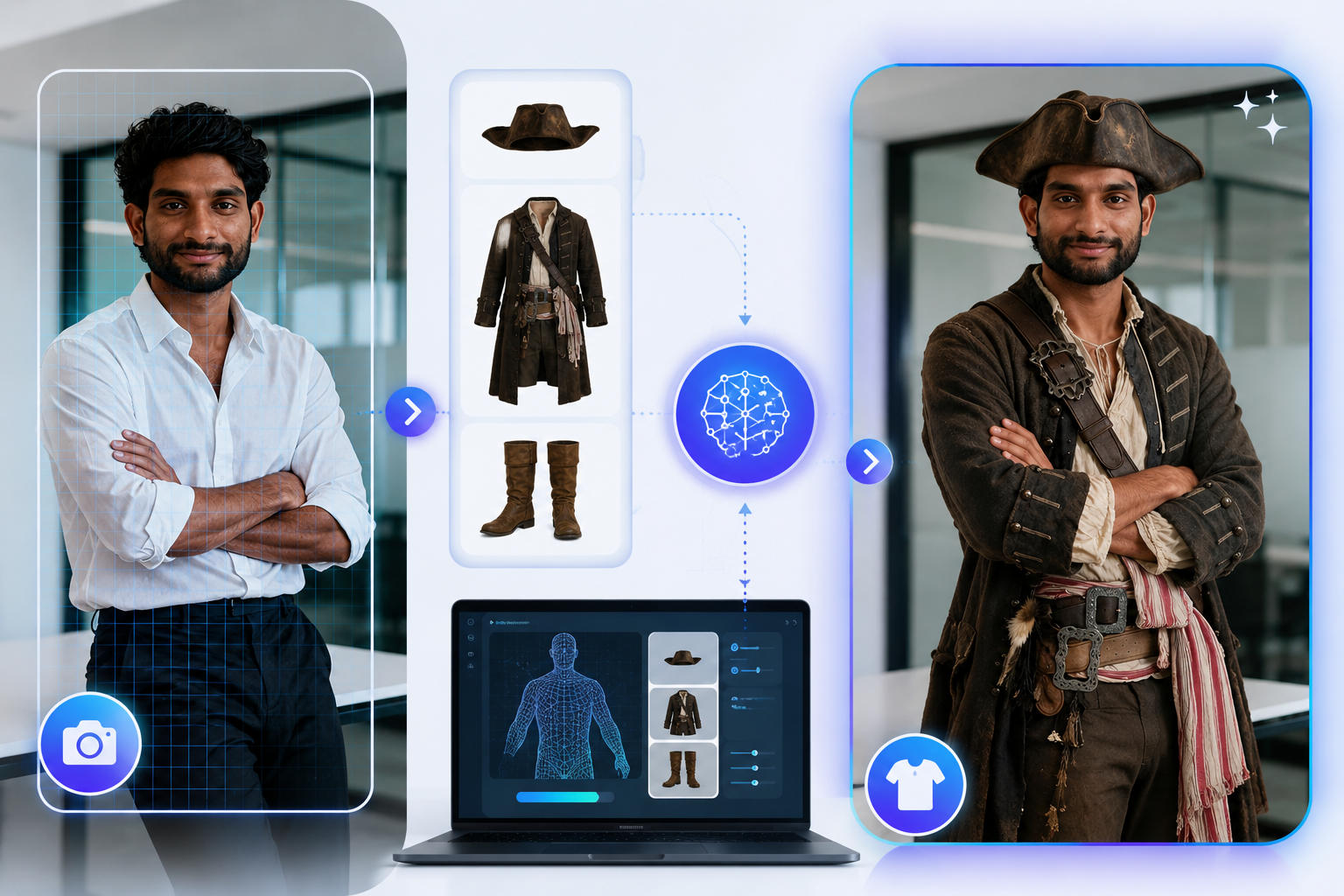
You’ve probably already spent time imagining how a different shirt, dress, or jacket would look before actually wearing it. What you may not know is that AI can digitally change clothing in a photo, allowing you to preview different outfits without physically changing clothes. In this guide, we’ll explain virtual clothes try-on, show how it works, and walk you through creating virtual outfit images with Photo AI Studio.
Key Takeaways
- Virtual clothes try-on digitally places clothing on a person’s image so you can preview an outfit without physically wearing it.
- AI virtual try-on supports fashion visualization, e-commerce imagery, social media content, digital styling, and outfit experimentation.
- Image quality strongly affects virtual try-on results, so clear photos and suitable clothing references are important.
- Photo AI Studio can be used to create virtual clothing variations by combining a person’s reference image with different clothing or outfit concepts.
- Clothing categories such as T-shirts, shirts, dresses, jackets, trousers, casualwear, and formalwear can be tested depending on the tool.
- Better results usually come from clear images, suitable poses, accurate clothing references, and reviewing multiple generated variations.
- AI-generated try-on images should be treated as visualizations rather than exact measurements of physical fit or sizing.
What Is Virtual Clothes Try-On?
Virtual clothes try-on is an AI-powered technology that digitally places clothing on a person’s image to visualize how an outfit may look without physically wearing it. Instead of changing clothes in real life, the technology generates a new image that represents the person wearing the selected garment.
For example, you could upload a full-body photograph of yourself and provide a reference image of a jacket. The system can generate a new version of your photograph showing the jacket on your body while attempting to preserve your face, pose, and overall appearance.
Moreover, virtual clothing try-on can work as an AI clothes changer, virtual outfit generator, or digital dressing room depending on the platform. Google describes its own try-on technology as combining a user photo with apparel imagery to generate a new representation of the garment on the shopper.
How Is Virtual Try-On Different From Traditional Online Shopping?
Virtual try-on adds personalized visualization to conventional product photography. Traditional fashion listings usually show clothing on a model, mannequin, or flat-lay image, while virtual try-on attempts to show the garment on a selected person.
For example, instead of asking whether a black blazer will suit you based on a model’s photograph, you can generate a preview using your own image.
At the same time, virtual try-on is not the same as physically checking garment measurements. A generated image can show visual appearance, but it should not be treated as a guaranteed prediction of physical fit. Google specifically notes that generated try-on images can contain mistakes and do not indicate fit or size availability.
Why Is Virtual Clothes Try-On Important for Fashion and E-Commerce?
Virtual clothes try-on is important because it makes fashion visualization faster, more personalized, and easier to experiment with. Shoppers can preview styles, creators can develop content, and retailers can show products in additional visual contexts.
For example, Google reported that its virtual try-on images for dresses received 60% more high-quality views than other shopping images, while shoppers tried garments on an average of four models per product. — Source: Google, 2024
Moreover, the technology is becoming increasingly relevant to online shopping. Google’s 2025 shopping updates expanded virtual try-on to users’ own photos and additional clothing categories, showing how quickly personalized fashion visualization is developing.
The broader virtual try-on market was estimated at $15.18 billion in 2025 and is projected by Mordor Intelligence to reach $48.10 billion by 2030. — Source: Mordor Intelligence, 2025
How Can Virtual Try-On Help Creators?
Virtual try-on helps creators produce multiple outfit concepts without photographing every physical outfit. A creator can start with one suitable portrait or full-body photograph and experiment with different clothing concepts.
For example, a fashion influencer could create separate images featuring a casual T-shirt, formal blazer, denim jacket, and evening dress from a consistent base image.
How to Get a Professional Headshot (AI or Camera)
How Can Virtual Try-On Help E-Commerce Businesses?
Virtual try-on can help e-commerce businesses provide more personalized product visualization. Instead of relying only on standard model photographs, retailers can allow shoppers to visualize garments on different people or their own images.
For example, Google expanded its apparel try-on technology to tops, bottoms, dresses, jackets, and shoes in India, allowing shoppers to upload a photo and visualize apparel on themselves. — Source: Google, 2025
How Does AI Virtual Clothes Try-On Work?
AI virtual try-on involves analyzing a person’s image and clothing reference, then generating a new image that combines the person’s appearance, pose, and the selected garment. The exact technology differs between platforms, but most image-based workflows follow a similar process.
For example, a system may receive one photograph of a person and another image showing a shirt. The AI analyzes both images before generating a composite result.
Step 1: Analyze the Person
The first stage identifies important visual information about the person, including body position, visible clothing areas, face, pose, and image composition. This information helps the system determine where the replacement garment should appear.
For example, a front-facing full-body photograph provides considerably more usable information than a heavily cropped photograph where the torso is hidden.
Step 2: Analyze the Clothing
The second stage analyzes the garment reference to identify its shape, color, structure, patterns, and visible details. Modern generative systems can attempt to reproduce details such as folds, wrinkles, shadows, and draping.
Google’s virtual try-on research describes a system that uses garment and person images together with diffusion-based generation and cross-attention to create the resulting image. — Source: Google Research, 2023
Step 3: Generate the Outfit
The AI then generates a new image that attempts to preserve the person’s identity while placing the selected garment into the appropriate body region. The result depends heavily on the quality and compatibility of the source images.
For example, a straight-on person image paired with a clear front-facing shirt reference generally provides a simpler visual problem than a side-facing person wearing an obstructed outfit.
Learn how to generate AI photos using text prompts or reference images and create realistic visuals step by step.
Step 4: Review the Result
The final stage requires visual review because AI-generated clothing images can contain inaccurate details. Check the neckline, sleeves, buttons, patterns, hands, body proportions, and garment edges before using the image commercially.
AI virtual try-on is a visualization technology, not a guaranteed physical fitting measurement. Google also warns that generated images may contain errors in body shape, personal features, and clothing details. — Source: Google Shopping Help, 2026
How Can You Prepare an Image for AI Clothes Try-On?
A clear, high-quality person image and an unobstructed clothing reference can help AI virtual try-on systems produce more realistic outfit results. Good source images reduce ambiguity and give the system more useful visual information.
For example, Google’s own try-on guidance recommends full-body images, good lighting, clean backgrounds, visible hands, and fitted clothing for better results. — Source: Google Shopping Help, 2026
Choose the Right Person Image
A full-body or appropriately framed photograph with good lighting is usually a strong starting point. Keep the person visible and avoid poses that hide large parts of the body.
Use an image with:
- Clear lighting
- Minimal background clutter
- A visible body outline
- A relatively natural pose
- Good image resolution
- No unnecessary people in the frame
For example, standing upright against a simple background gives the system clearer information than sitting on a sofa with arms and clothing overlapping the torso.
Choose a Good Clothing Reference
A clothing reference should show the garment clearly enough for its important visual characteristics to be recognized. Front-facing product images are often easier to work with than photographs where the garment is heavily folded or partially hidden.
For example, a clean product photograph of a blue blazer gives the system clearer information about the garment than a dark photograph where the blazer blends into the background.
How Do You Try Clothes on Virtually With Photo AI Studio?
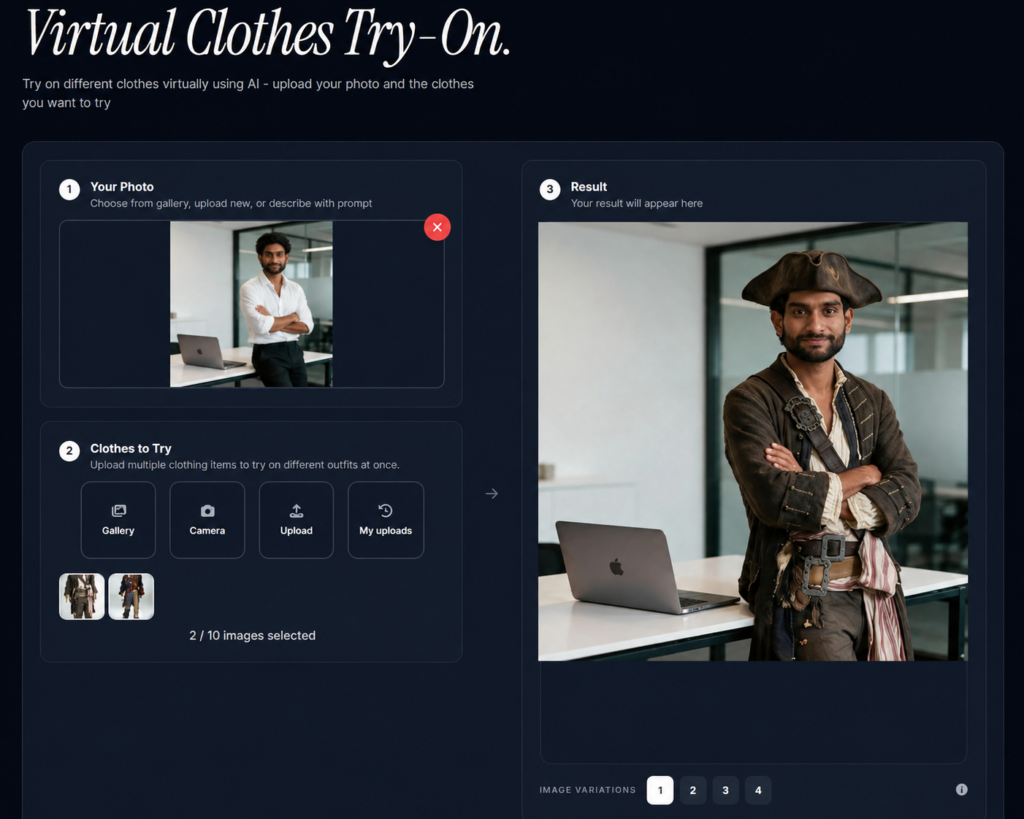
Photo AI Studio can be used to create virtual clothing variations by combining a person’s reference image with different clothing or outfit concepts. The workflow is designed to turn a suitable source image into a new fashion visualization without requiring a physical outfit change.

Before starting, prepare a clear person image and a suitable clothing reference.
Step 1: Upload the Person or Reference Image
Start by uploading the photograph you want to use as the base for the virtual outfit. Choose an image where the person’s body and clothing area are clearly visible.
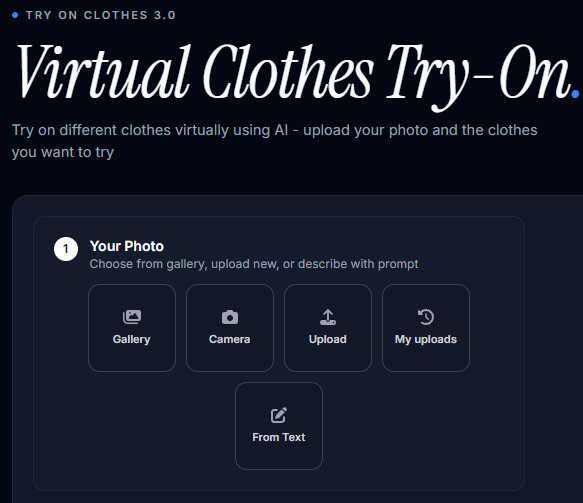
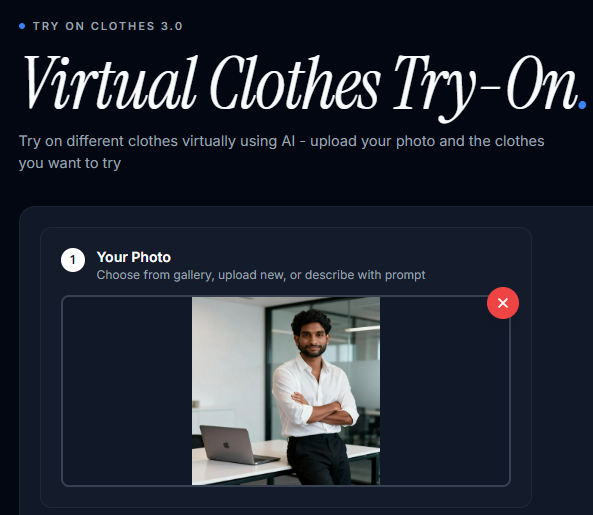
For example, use a full-body image if you want to visualize an entire outfit such as a White Shirt with Black Pant.
Step 2: Provide the Clothing or Outfit Concept
Next, provide the clothing reference or describe the outfit you want to visualize. A clear reference helps establish the intended garment’s appearance.
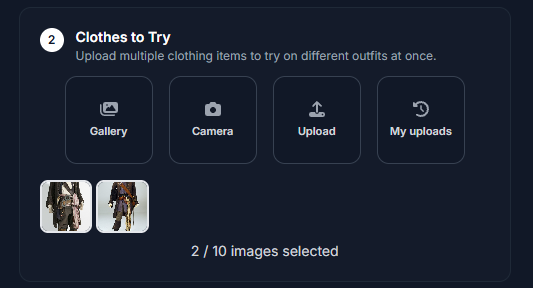
For example, you could work with a reference for a white shirt, denim jacket, formal blazer, long dress, or vintage pirate costume.
Step 3: Generate the Virtual Outfit
Generate the image once the person and clothing references are selected. The system analyzes the visual details and produces a new image with the chosen outfit applied.
For example, a person wearing a simple T-shirt can be shown in a formal jacket while keeping the original pose, framing, and overall composition consistent.

Step 4: Review and Refine the Result
Review the generated image carefully before accepting it as the final result. Look for unnatural garment boundaries, incorrect patterns, distorted hands, inconsistent proportions, or details that changed unexpectedly.
For example, check whether a jacket’s lapels, buttons, sleeves, and shoulder structure look natural.
If the first result is not ideal, try a different reference image or generate another variation rather than assuming the technology cannot produce the desired look.
Step 5: Download the Final Image
Download the final result once the clothing, proportions, and overall appearance look appropriate for your intended use. Keep the original photograph so you can create additional variations later.

What Types of Clothes Can You Try On Virtually?
Virtual clothes try-on can support many fashion categories, including tops, T-shirts, dresses, jackets, trousers, casualwear, and formalwear. The exact categories and quality depend on the platform and source images.
For example, Google’s apparel try-on technology has expanded beyond tops to dresses, pants, skirts, jackets, and shoes across different releases and markets.
| Clothing type | Example virtual try-on use |
|---|---|
| T-shirts | Test colors, prints, and casual styles |
| Shirts | Preview everyday or smart-casual outfits |
| Dresses | Visualize different silhouettes and styles |
| Jackets | Test denim, leather-look, casual, or formal layers |
| Trousers | Explore different cuts and outfit combinations |
| Formalwear | Preview blazers, suits, and event outfits |
| Casualwear | Create social media and lifestyle concepts |
| Fashion concepts | Experiment with original outfit ideas |
Moreover, more complex garments can present greater challenges because the AI must represent additional structure, layering, folds, and body coverage. Google’s research specifically notes that dresses create unique challenges because they are more nuanced garments and cover more of the body. — Source: Google, 2024
How Can You Get More Realistic Virtual Try-On Results?
You can get more realistic virtual try-on results by improving the quality, compatibility, and consistency of your source images. Better inputs give the generation system clearer visual information.
For example, a well-lit full-body photograph paired with a clean garment reference is usually a stronger starting point than two low-resolution, heavily cropped images.
Use Consistent Poses
Consistent poses make clothing replacement easier because the system has a clearer understanding of the body’s position. Start with relatively natural poses before experimenting with unusual angles.
Use Clear Garment References
Clear clothing references help preserve important garment characteristics such as colors, patterns, sleeves, collars, and silhouettes. Avoid references where the garment is hidden behind other objects.
Generate Multiple Variations
Generating several variations can help you identify the most convincing result. AI generation is not deterministic enough to assume the first output will always be the best.
For example, generate three variations of the same blazer and compare the collar, sleeves, fabric appearance, and body proportions.
Check the Details
Always inspect important clothing details before publishing a generated fashion image. AI systems can occasionally alter logos, patterns, buttons, seams, hands, or proportions.
What Are the Best Uses for Virtual Clothes Try-On?
Virtual clothes try-on is useful for fashion visualization, e-commerce product imagery, social media content, digital styling, and testing outfit concepts before creating physical photographs. The technology is particularly useful when producing multiple visual variations quickly.
For example, a small fashion brand could visualize several color and styling concepts before deciding which outfits deserve a professional photoshoot.
Fashion E-Commerce
Online retailers can use virtual try-on to help shoppers visualize garments before purchasing. Google says its apparel technology can show garments across different body types and sizes, helping shoppers explore products more confidently.
Social Media Content
Creators can use virtual outfit generation to produce fashion content without photographing every physical combination. This can help maintain a consistent visual style across posts.
Personal Styling
Personal styling becomes easier when users can compare multiple outfit concepts from a single photograph. For example, you could compare casual, business-casual, and formal versions of the same base image.
Fashion Marketing
Fashion marketers can use AI-generated outfit concepts to explore campaign directions before investing in physical production. A generated concept can serve as an early visual reference for a photographer, designer, or creative team.
What Should You Look for in a Virtual Try-On Tool?
A good virtual try-on tool should balance image quality, garment accuracy, ease of use, generation speed, editing controls, output resolution, and usage rights. The best option depends on whether you are experimenting personally or producing commercial content.
For example, a casual user may prioritize simplicity, while an e-commerce business may need higher resolution and clear commercial-use terms.
| Feature | Why it matters |
|---|---|
| Image quality | Determines how realistic the final visualization appears |
| Garment accuracy | Helps preserve clothing details and structure |
| Ease of use | Reduces the learning curve for beginners |
| Editing controls | Helps refine unwanted results |
| Generation speed | Matters when producing multiple variations |
| Output resolution | Important for websites and marketing assets |
| Commercial terms | Important for businesses and paid campaigns |
| Reference-image support | Enables more controlled outfit generation |
Photo AI Studio is one option to evaluate if your goal is creating AI-generated fashion variations from reference imagery.
At the same time, users should compare tools rather than choosing one purely because it produces attractive demonstrations. Image consistency, garment preservation, editing flexibility, privacy practices, output quality, and licensing terms are important evaluation criteria.
Free or widely available options can also be useful for comparison. For example, Google Shopping provides an apparel virtual try-on experience in supported markets, including India, although availability and supported products can vary.
What’s Next: How Can You Improve Your Virtual Try-On Workflow?
The next step is to build a repeatable workflow using high-quality images, consistent references, multiple variations, and careful quality checks. A repeatable process makes it easier to create reliable fashion visuals.
First, select a strong base photograph. Then choose a clear clothing reference and generate several variations.
Next, compare the outputs for garment accuracy, body proportions, lighting consistency, and unwanted visual changes.
Finally, keep the best result and use additional image editing only when necessary.
Can AI Virtual Try-On Create Realistic Outfit Images?
Yes, AI virtual try-on can create highly realistic-looking outfit images, but the results are visual approximations rather than guaranteed representations of physical fit. Modern systems can reproduce details such as garment folds, shadows, wrinkles, and draping, but generated images can still contain mistakes.
For example, Google’s apparel research specifically focuses on generating realistic representations of how garments drape, cling, stretch, wrinkle, and interact with different body shapes. — Source: Google, 2023
Therefore, use virtual try-on as a visualization tool rather than a substitute for checking garment measurements, sizing, material, or physical fit.
Frequently Asked Questions (FAQs)
Q1: What is virtual clothes try-on?
A: Virtual clothes try-on is a technology that digitally places clothing on a person’s image to show how an outfit may look without physically wearing it.
Q2: How does AI virtual clothes try-on work?
A: AI virtual try-on analyzes a person’s image and a clothing reference, then generates a new image that combines the person’s appearance, pose, and selected garment.
Q3: Can I try clothes virtually using my own photo?
A: Yes. Many virtual try-on systems allow you to upload a photo of yourself and generate different outfit variations using clothing references.
Q4: How can I get better virtual clothes try-on results?
A: Use a clear person image, choose an unobstructed clothing reference, maintain a suitable pose, and generate multiple variations before selecting the best result.
Q5: Can I use virtual clothes try-on for social media?
A: Yes. Virtual try-on can help create fashion posts, outfit concepts, styling ideas, and other visual content for social media.
Conclusion: Make Outfit Experimentation Faster With Virtual Try-On
Virtual clothes try-on makes it easier to experiment with different outfits by digitally visualizing garments on a person’s image. The technology can support shoppers, creators, influencers, fashion brands, e-commerce businesses, marketers, and designers.
Moreover, the quality of the result depends heavily on the inputs. A clear person image, a suitable clothing reference, a compatible pose, and careful review can significantly improve the final visualization.
Photo AI Studio can be a practical option for experimenting with virtual clothing variations from reference images. Start with one good photograph, test a few different garments, compare the generated results, and refine your workflow as you learn what produces the most convincing images.
Virtual try-on turns outfit experimentation into a faster digital workflow—so you can explore more styles before committing to a physical outfit or photoshoot.
Written by Muthumanickam — SEO and Content Creation Specialist with 5+ years of experience across SEO, blogging, affiliate marketing, and content creation on different platforms.
Pingback: How to Use a Background Remover to Get Transparent Images Instantly? - aitooltrusted.com