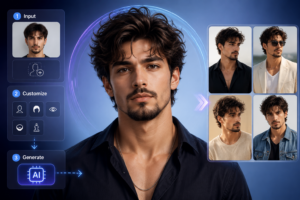
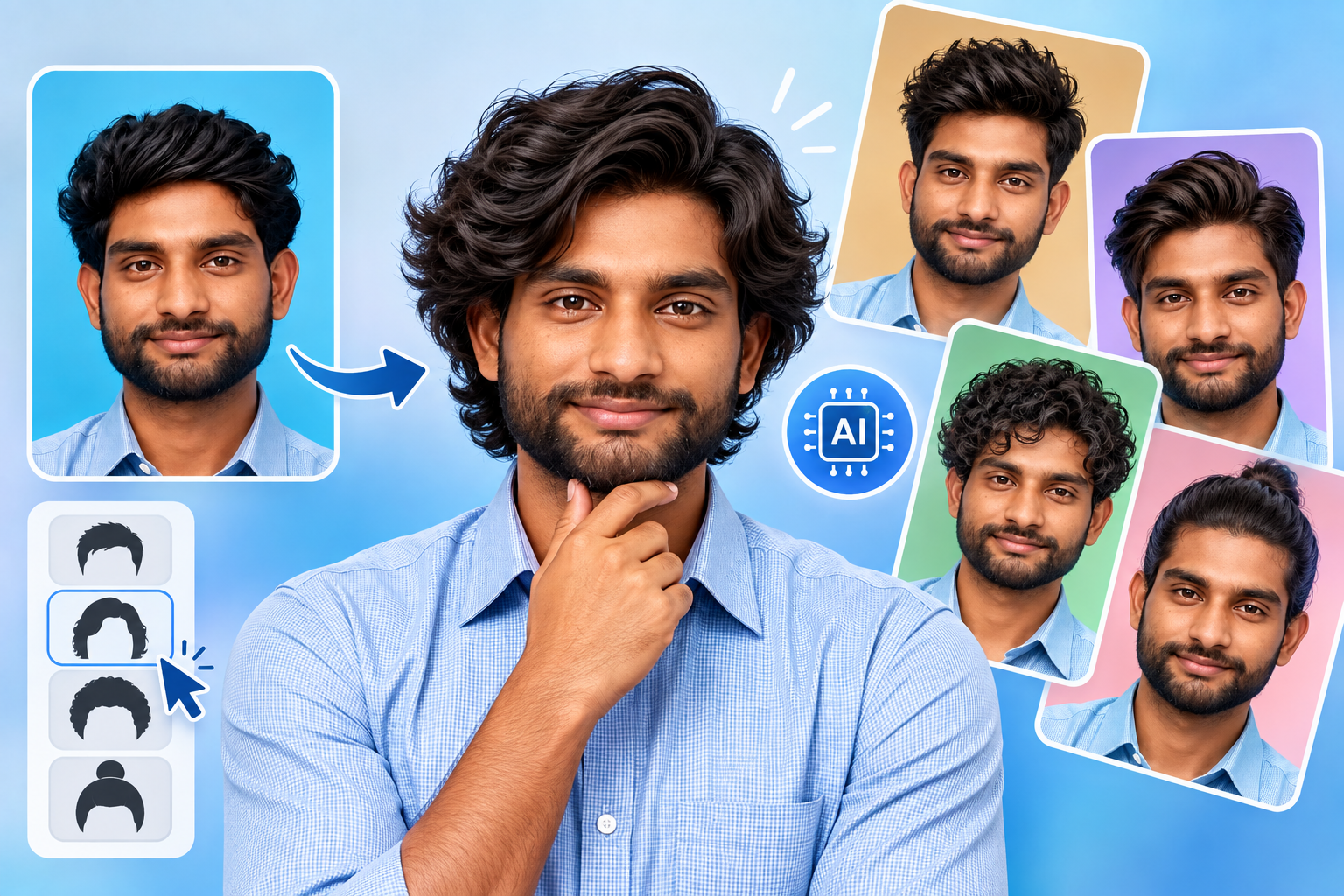
You’ve probably already saved hairstyle photos before a haircut, but another person’s hairstyle does not always show how that look could appear on you. An AI hairstyle changer lets you preview different hairstyles using your own photo, and this guide explains how the technology works, which styles you can try, and how to create more realistic results with Photo AI Studio.
Key Takeaways
- AI hairstyle changers digitally modify hairstyles in photos to create virtual previews of different looks.
- Hairstyle transformations can include haircuts, lengths, textures, bangs, styling patterns, and hair colors.
- Clear, well-lit photos with visible facial and hair details generally provide better AI hairstyle previews.
- Specific hairstyle descriptions help AI tools generate more controlled and relevant transformations.
- Photo AI Studio can be used to experiment with AI-generated hairstyle variations without manually editing every image.
- Comparing several hairstyles can help you identify looks to discuss with a professional stylist.
- AI hairstyle previews are visual references rather than guarantees of real-world haircut or color results.
What Is an AI Hairstyle Changer and How Does It Work?
An AI hairstyle changer is an AI-powered image tool that digitally changes a person’s hairstyle in a photo to create a virtual preview of a different look. Unlike a simple filter, the technology attempts to generate new hair shapes, textures, lengths, and colors while maintaining important parts of the original portrait.
First, an AI hairstyle changer analyzes the uploaded image to understand elements such as the person’s face, hair area, lighting, and overall composition. For example, if you upload a front-facing portrait and request medium-length wavy brown hair, the system generates a new version of the image with those characteristics.
Moreover, an AI hairstyle transformation typically involves uploading a photo, selecting or describing a hairstyle, generating the edited image, and refining the result when necessary. This makes the process different from traditional manual editing, where you would need to cut, mask, reshape, recolor, and blend hair yourself.
For readers exploring related technology, an AI photo generator can create new images from prompts, while an AI photo editor focuses on modifying existing images. An AI hairstyle changer sits between these concepts because it transforms an existing portrait while trying to preserve the person’s identity.
AI Hairstyle Changer vs. Face Swap vs. Photo Editing
An AI hairstyle changer primarily modifies hair, while face swapping replaces facial identity and general photo editing can modify many individual image elements. Understanding this difference helps you choose the right tool for your goal.
| Technology | Main Purpose | Typical Example |
|---|---|---|
| AI hairstyle changer | Change hairstyle or hair color | Try a bob cut on your selfie |
| Face swap | Replace one person’s face with another | Put one person’s face onto another portrait |
| AI photo editor | Modify existing image elements | Remove objects or change backgrounds |
| AI photo generator | Create new images | Generate a portrait from a text prompt |
| Virtual makeover tool | Preview multiple appearance changes | Combine hair, makeup, clothing, and styling |
Why Should You Use AI to Try a New Hairstyle?
AI hairstyle changers matter because they reduce the uncertainty involved in choosing a new haircut, hairstyle, or hair color. Instead of relying only on a reference photo, you can see a simulated version of the style on your own face.
First, virtual hairstyle try-on makes experimentation faster because you can test several options without physically changing your hair. For example, you could compare a short bob, long layers, soft waves, and bangs using the same portrait.
Second, AI hairstyle tools can support creative experimentation. Adobe reported in 2025 that 86% of surveyed creators were actively using creative generative AI, while 81% said it helped them create content they otherwise could not have made — Source: Adobe Creators’ Toolkit Report, 2025.
At the same time, hairstyle previews can be useful for content creators. You can experiment with a new appearance for social posts, profile images, makeover concepts, or visual storytelling without immediately changing your real hairstyle.
In addition, AI tools can help you communicate with a hairstylist. A generated image can become a visual reference, although your stylist should still assess your actual hair texture, density, condition, and maintenance requirements.
How Does an AI Hairstyle Changer Work Step by Step?
An AI hairstyle changer works by analyzing a portrait, identifying the hair and facial region, applying the requested hairstyle, and generating a new image. The process usually consists of several connected stages.
1. Upload a Suitable Photo
The first step is uploading a photo that gives the AI enough visual information to understand your face and existing hair. A clear, front-facing portrait with good lighting generally gives the system more useful information.
For example, a photo where your forehead, face, hairline, and existing hairstyle are visible is usually easier to transform than a dark selfie with sunglasses and heavy shadows.
2. Identify the Hair and Facial Area
The AI analyzes the portrait to determine where the person’s face and hair are located. This helps the system modify the hairstyle while attempting to preserve important facial characteristics.
For example, when generating a short haircut, the system needs to understand where the hair ends and where the forehead, ears, and face begin.
3. Select or Describe a Hairstyle
The hairstyle instruction tells the AI what visual transformation to create. Depending on the tool, you may select a preset hairstyle, enter a text description, or upload a reference image.
For example, instead of simply writing new hairstyle, a more specific instruction could be medium-length wavy hair with soft layers and natural dark-brown color.
4. Generate the Transformation
The AI generates a new image based on your original photo and hairstyle instructions. Modern AI image systems can synthesize hair structure, texture, lighting, and shape rather than simply placing a static hair sticker over the original image.
5. Review and Refine the Result
The final step is reviewing the generated image and refining the hairstyle if necessary. If the first result is not what you expected, you can adjust the hairstyle description, length, texture, or color and generate another version.
What Hairstyles Can You Try With an AI Hairstyle Changer?
AI hairstyle changers can help you experiment with short, medium, long, curly, straight, wavy, layered, braided, and other hairstyle categories. The exact options depend on the tool, but AI makes it possible to explore a much broader range of looks than a traditional fixed filter.
Short, Medium, and Long Hairstyles
Hair length is one of the easiest hairstyle characteristics to experiment with using AI. You can compare a short pixie cut with a medium bob or long layered hair without physically cutting your hair.
For example, someone considering a dramatic change could generate three versions: short textured crop, shoulder-length waves, and long layered hair.
Curly, Straight, Wavy, and Textured Styles
Hair texture changes can significantly alter the overall appearance of a hairstyle. AI can be used to explore straight, loose waves, curls, textured cuts, and other styling patterns.
For example, a person with straight hair could preview soft beach waves or defined curls to explore a different aesthetic.
Bobs, Bangs, Layers, Braids, and Updos
Structured hairstyle categories give you more specific ways to experiment with your appearance. Common examples include:
- Bob and lob cuts
- Curtain bangs and straight bangs
- Layered hairstyles
- Braids and protective styles
- Ponytails and updos
- Fades and textured men’s cuts
- Pixie and cropped hairstyles
- Long flowing hairstyles
Hair Colors
AI hair color changers let you preview color changes without immediately dyeing your hair. You can experiment with natural shades such as black, brown, blonde, and auburn as well as more creative colors.
For example, you could compare dark brown hair, platinum blonde, and copper red while keeping the same hairstyle.
How Can You Change Your Hairstyle With Photo AI Studio?
You can change your hairstyle with AI by uploading a portrait, selecting a hairstyle or reference, choosing optional hair color settings, and generating the transformation. Photo AI Studio provides a practical example of this workflow.
Photo AI Studio

Step 1: Open Photo AI Studio and Choose Hairstyle Changer
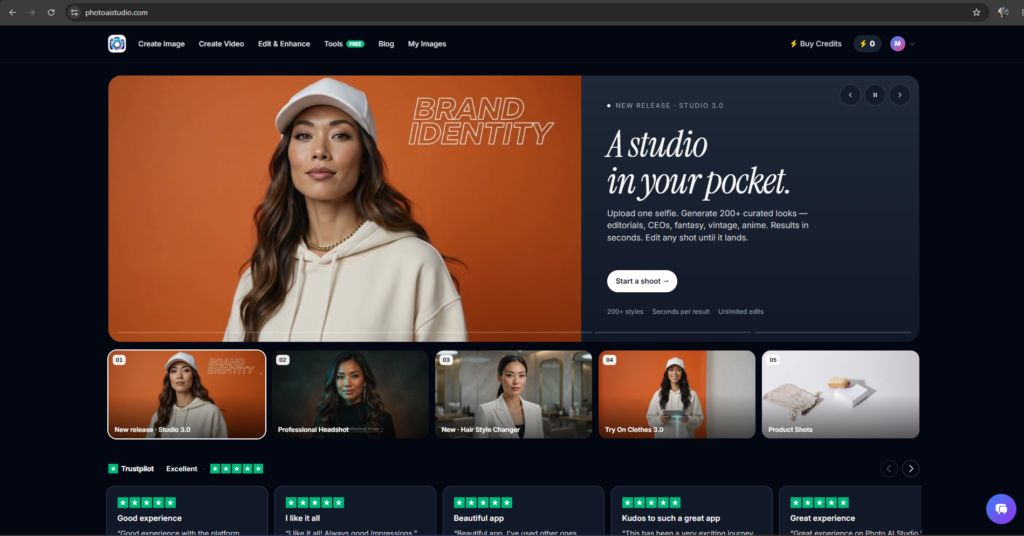
Photo AI Studio provides a Hair Style Changer designed to let you preview a new cut or color using your own photo. The current Photo AI Studio website describes its Hair Style Changer as a way to try looks such as pixie cuts, curls, bobs, and hair colors.
First, open Google and search for “Photo AI Studio.” Then, select the official Photo AI Studio website from the search results.
Step 2: Select Create Image and Hairstyle Changer
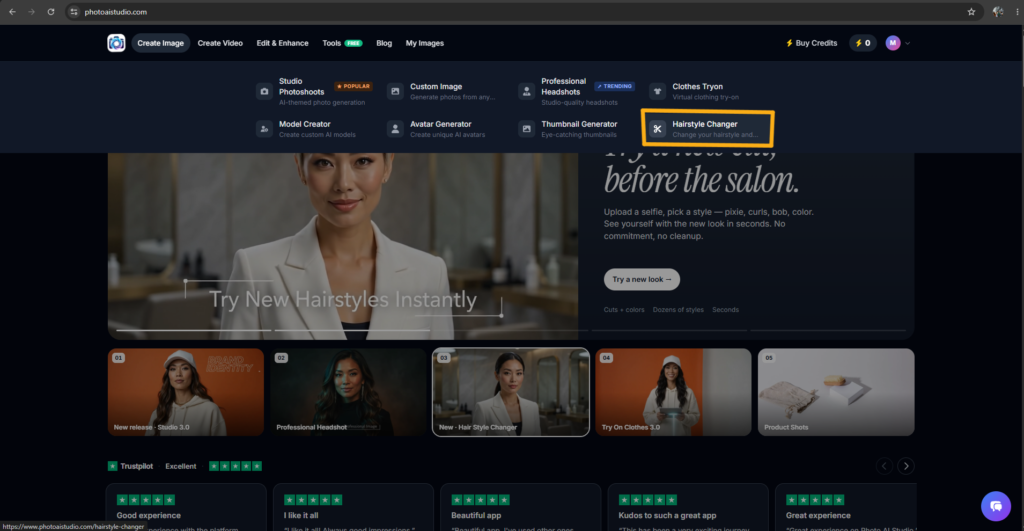
The next step is selecting “Create Image” and then choosing “Hairstyle Changer.” This takes you to the hairstyle transformation workflow.
Step 3: Upload Your Photo
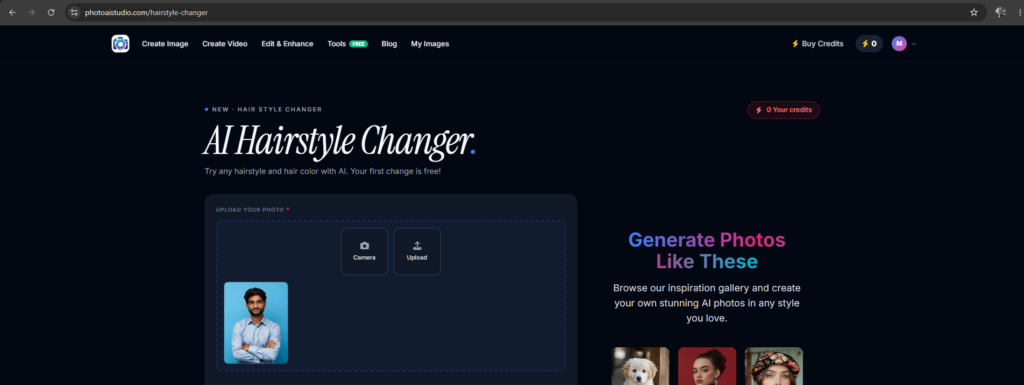
The first required step inside the hairstyle workflow is uploading your photo. For this demonstration, you can upload a portrait directly from your computer.
For the best result, use a clear photo where the face and existing hair are easy to see. Avoid images where the subject is heavily blurred, poorly lit, or partially obstructed.
Step 4: Select Gender
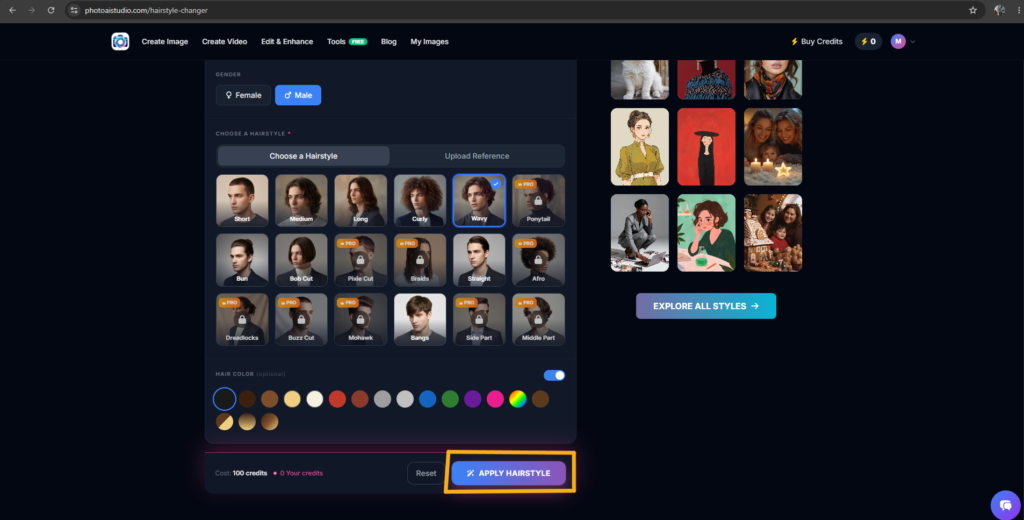
The Gender option lets you choose between Female and Male for the hairstyle transformation workflow. For this example, select Male.
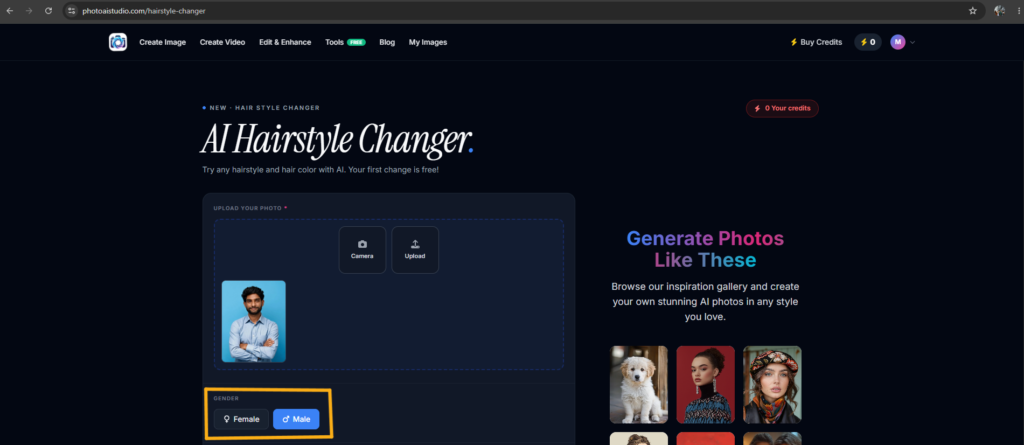
This setting can help the workflow apply a more relevant hairstyle selection to the portrait.
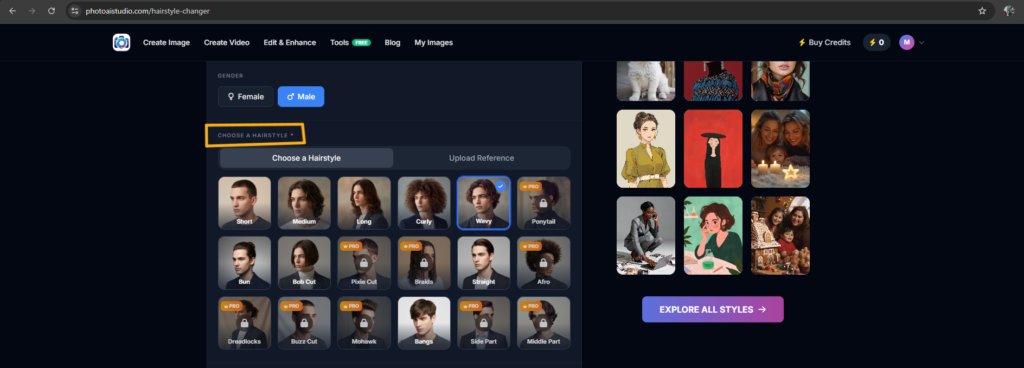
Step 5: Choose a Hairstyle
The Choose a Hairstyle section is where you select the look you want to preview. Photo AI Studio provides built-in hairstyle options, while its workflow also supports using a reference image for a specific look.
For this example, select Wavy from the available hairstyle choices.
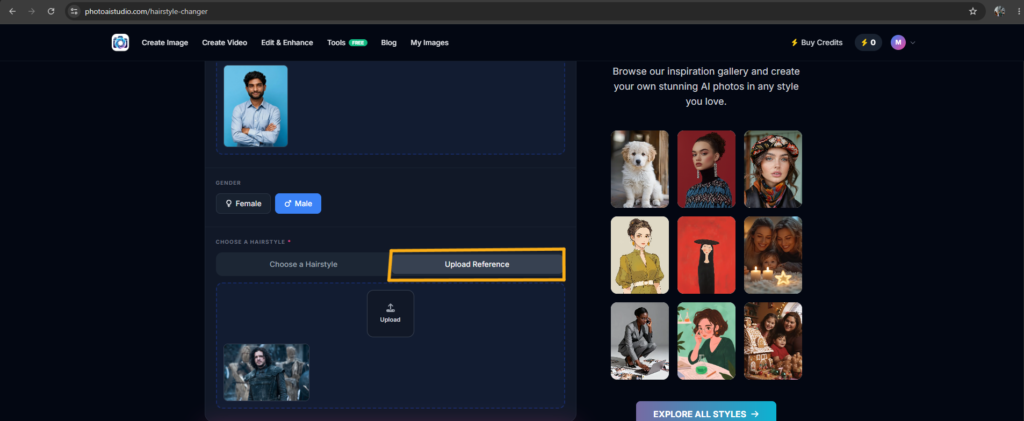
Step 6: Upload a Reference Hairstyle
A reference image is useful when you already have a specific hairstyle in mind. Instead of relying entirely on a preset, you can upload an example that communicates the shape, length, or styling direction you want.
For example, you could use a Jon Snow-inspired hairstyle reference to communicate the desired long, textured look.
That being said, reference images should be treated as style inspiration rather than an instruction to reproduce another person’s identity.
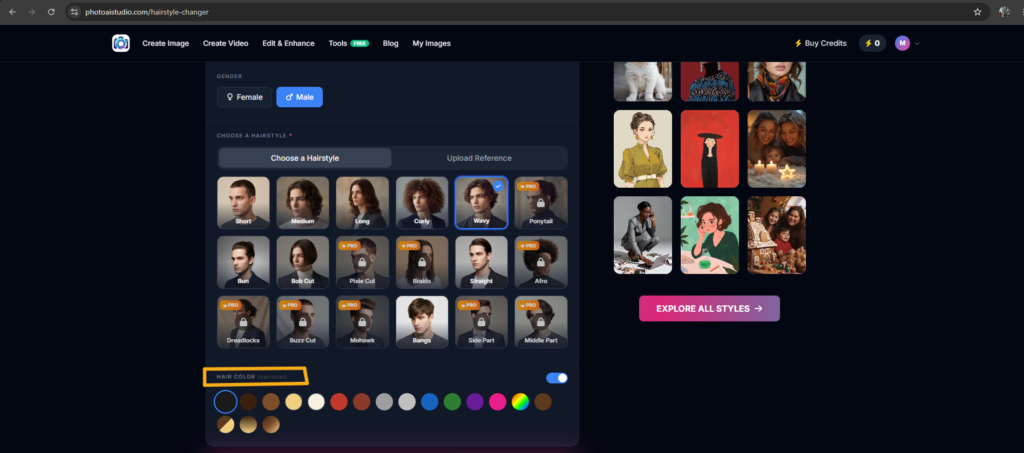
Step 7: Choose an Optional Hair Color
Hair color is an optional part of the transformation, so you can leave it unchanged if you only want to test a new hairstyle. If you want a bigger makeover, activating the hair-color option allows you to experiment with a different shade.
For example, you might discover that the hairstyle looks better in brown than blonde, or that a particular color works better with the selected haircut.
Step 8: Apply the Hairstyle
The Apply Hairstyle button starts the AI transformation after you have selected your settings. Before generating the image, review your photo, hairstyle, reference image, and optional color selection.
Then, click Apply Hairstyle and allow the AI to process the image.
Step 9: Review the Generated Result
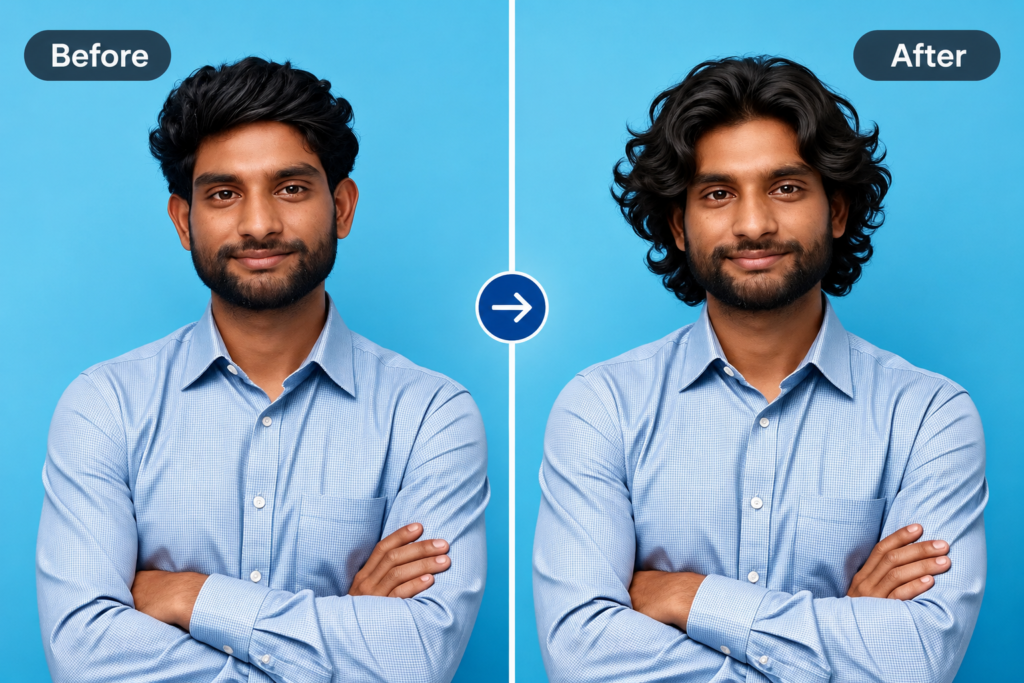
The generated result shows how the selected hairstyle may appear on your uploaded portrait. Compare the hair shape, length, texture, color, and overall balance with your original photo.
Photo AI Studio currently promotes its Hair Style Changer as a way to preview styles such as pixie cuts, curls, bobs, and color changes before making a real-world change.
What Photo Works Best for an AI Hairstyle Transformation?
A clear, well-lit, front-facing photo with visible facial and hair details generally works best for an AI hairstyle transformation. Better source images give the system more visual information about your face, hairline, lighting, and current hairstyle.
First, choose a photo with even lighting and minimal shadows. For example, a portrait taken near a window can be more useful than a dark image captured in a nightclub.
Second, keep your face and hair visible. Avoid hats, sunglasses, extreme filters, heavy blur, or hair covering large portions of the face.
Third, avoid extreme camera angles when possible. A straight-on or slightly angled portrait gives the AI a clearer reference for applying the new hairstyle.
You can also use an AI model creator to create professional and consistent AI-generated models.
How Do You Get More Realistic AI Hairstyle Results?
You can get more realistic AI hairstyle results by using a high-quality source photo and giving the AI specific hairstyle instructions. The quality of the input image and clarity of the request both influence the usefulness of the final preview.
Use Specific Hairstyle Descriptions
Specific descriptions give an AI hairstyle generator clearer instructions than vague requests. For example, short hair is less precise than short textured crop with a low fade and slightly longer top.
Useful prompts can describe:
- Hair length
- Texture
- Cut type
- Bangs or layers
- Hair color
- Parting
- Overall styling direction
For example: “Medium-length wavy hairstyle with soft layers, natural dark-brown color, realistic hair texture, and the same facial features.”
Compare Multiple Results
Comparing several AI hairstyle variations provides more useful information than relying on one generated image. Create versions with different lengths, textures, and colors before choosing a favorite.
For example, generate short textured, medium wavy, and long layered versions, then compare them side by side.
AI hairstyle previews are visual references rather than guarantees because real hair behavior depends on factors such as texture, density, growth pattern, styling technique, and the actual haircut.
Can AI Show You What a Haircut Will Look Like Before You Get It?
Yes, an AI hairstyle changer can create a visual approximation of what a haircut may look like before you get it. The generated image can help you compare styles and communicate an idea to a hairstylist.
However, AI cannot perfectly predict real-world results. A generated image may not accurately represent how your actual hair density, curl pattern, hairline, or natural growth direction will behave.
For example, a virtual curly bob may look excellent in an AI preview but require significant styling effort if your natural hair is very straight.
As such, the best approach is to use AI as a decision-making aid, then ask a professional stylist whether the selected cut works with your real hair characteristics.
How Can You Use AI Hairstyle Changer Examples in Real Life?
AI hairstyle previews can support haircut planning, hair-color experimentation, social-media content, makeover concepts, and personal style exploration. The same technology can serve both practical and creative purposes.
Before a Salon Appointment
A hairstyle preview can help you arrive at a salon with a clearer visual reference. Instead of describing a haircut entirely with words, you can show your stylist several generated examples.
For Social Media
AI hairstyle transformations can create visual content without requiring an immediate physical makeover. This can be useful for reels, thumbnails, profile images, and beauty-related posts.
Generative AI is also widely used for creating new visual assets—Adobe found that 52% of surveyed creators use it to generate images and video, a use case that aligns directly with AI hairstyle tools.
You can also create a professional look with a professional headshot generator.
For Complete Makeover Concepts
AI hairstyle tools can become one part of a broader virtual makeover workflow. You can combine hairstyle experimentation with clothing, portraits, and other visual transformations.
For example, you could test a new hairstyle and then create a matching professional portrait or social-media profile image.
You can also try different outfits with a virtual clothes try-on tool.
What Should You Do After Creating an AI Hairstyle Preview?
After creating an AI hairstyle preview, compare your favorite results, save useful references, and discuss the most realistic options with a professional stylist. The goal is not simply to generate a visually attractive image but to make a more informed real-world decision.
First, save two or three of your strongest options rather than choosing immediately. Second, compare the same hairstyle at different lengths or colors to understand which variation you prefer.
Third, show your preferred AI preview to a hairstylist and ask whether the style is practical for your hair type and maintenance routine.
Moreover, remember that AI-generated hair is an approximation. Real-world results can differ because hair texture, density, scalp shape, growth direction, and professional styling all affect the finished appearance.
You can also follow our guide on how to make a profile avatar to create a professional AI-generated profile image.
How Can You Generate Better AI Photos for Hairstyle and Style Experiments?
You can create more useful hairstyle and style experiments by starting with a strong portrait and combining AI transformation with other image-generation workflows. A consistent source image makes it easier to compare different visual concepts.
For example, after generating your hairstyle preview, you could use an AI photo generator to create a polished portrait around the new look or explore different environments.
Similarly, an AI model creator can be useful for visual content workflows where you want to build consistent AI-generated characters or models.
Frequently Asked Questions (FAQs)
Q1: What is an AI hairstyle changer?
A: An AI hairstyle changer is an AI-powered image tool that digitally changes a person’s hairstyle in a photo to create a virtual preview of a different look. It can simulate different haircuts, lengths, textures, styles, and colors while attempting to preserve the person’s recognizable facial features.
Q2: How does an AI hairstyle changer work?
A: An AI hairstyle changer typically analyzes your uploaded photo, identifies the hair and facial areas, applies your selected hairstyle, and generates a transformed image. You can usually choose a preset hairstyle, describe a specific look, or upload a hairstyle reference image.
Q3: Can I change my hairstyle with AI using my own photo?
A: Yes. Most AI hairstyle tools allow you to upload your own photo and generate a virtual hairstyle transformation. A clear, front-facing image with visible hair and facial details generally provides a better starting point.
Conclusion: Experiment With Your Next Hairstyle Before Making the Change
An AI hairstyle changer makes it easier to experiment with haircuts, lengths, textures, bangs, and colors before making a real-world change. The basic workflow is simple: upload a suitable photo, select or describe a hairstyle, generate the transformation, compare the result, and refine it when necessary.
First, start with a clear and well-lit portrait. Next, use specific hairstyle descriptions or a useful reference image. Then, compare multiple variations instead of relying on a single AI result.
Photo AI Studio provides a practical way to explore hairstyle variations from your own photo, including options for experimenting with cuts, curls, bobs, and colors.
Ultimately, the best AI hairstyle preview is not the one that tells you exactly what to do. It is the one that helps you explore possibilities and communicate your preferred look more clearly. Try several styles, save your favorites, and use the results as inspiration for your next conversation with a professional stylist.
Written by
Muthumanickam — SEO & Content Creator with 5+ years of experience in SEO, content creation across different platforms, blogging, and affiliate marketing.