Most people already have a profile picture, whether it is a selfie, professional headshot, cartoon, or another image they use online. However, a basic profile picture does not always communicate the style, personality, or professional image you want to present. In this guide, we’ll explain what a profile avatar is, which styles work best, how to create one, and how to use AI tools such as Photo AI Studio to build a customized avatar.
Key Takeaways
- Profile avatars represent people, brands, characters, or identities through visual images used on digital profiles.
- Avatar styles include realistic portraits, AI-generated images, cartoons, illustrations, 3D characters, anime-inspired designs, and branded graphics.
- Avatar selection should depend on the platform, audience, personality, and purpose of the account.
- AI avatar generators can create customized profile images from reference photos, text descriptions, or selected visual styles.
- Good profile avatars use clear subjects, recognizable features, suitable lighting, simple backgrounds, and strong contrast.
- Photo AI Studio can help create customized profile images and refine them with shapes, backgrounds, shadows, borders, positioning, and filters.
- Avatar variations make it easier to choose an image that fits your personal or professional brand.
What Is a Profile Avatar and How Is It Different From a Profile Picture?
A profile avatar is a visual image that represents a person, brand, character, or identity on an online profile. For example, a freelancer might use a realistic portrait, while a gamer might use a stylized character as their profile avatar.
Moreover, a profile avatar and profile picture often mean the same thing in everyday online conversations, but the terms can have slightly different meanings. A profile picture usually refers to an actual image uploaded to an account, while an avatar can also be illustrated, generated, animated, or fictional.
For example, your LinkedIn headshot can function as a profile picture, while a cartoon version of yourself used on Discord can function as an avatar.
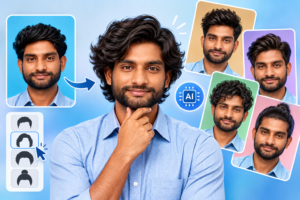
In addition, an AI profile avatar is an avatar created or customized with artificial intelligence using a reference photo, text description, or selected visual style. AI can transform one source image into multiple visual directions without requiring a new professional photoshoot for every variation.
You can also create a professional headshot using AI or a camera for a polished and professional look.
Why Is a Profile Avatar Important for Your Online Identity?
A profile avatar matters because it creates visual recognition and communicates an immediate impression of your online identity. For example, using the same recognizable avatar across your website, social accounts, and messaging platforms can make your personal brand easier to remember.
Moreover, the importance of profile images increases as people use more digital platforms. DataReportal reported 5.24 billion active social media user identities worldwide in January 2025, representing 63.9% of the global population — Source: DataReportal, 2025.
For example, a creator competing for attention across Instagram, YouTube, and other platforms benefits from having a recognizable visual identity instead of using a different random image everywhere.
At the same time, professional profiles can benefit from having a clear image. LinkedIn states that members with profile photos can receive up to 21 times more profile views and 9 times more connection requests than members without photos — Source: LinkedIn, 2018.
Furthermore, a profile avatar can help you protect some privacy when you do not want to publish a conventional personal photograph. A stylized avatar can represent you without revealing the exact appearance of a real photo.
What Are the Different Types of Profile Avatars?
A profile avatar can use realistic, illustrated, cartoon, 3D, anime-inspired, gaming, professional, or branded visual styles. For example, a consultant might choose a polished realistic avatar, while a gaming creator may prefer a dramatic character design.
| Avatar type | Best use case | Typical visual style |
|---|---|---|
| Realistic AI avatar | Personal brands | Photorealistic portrait |
| Professional avatar | LinkedIn and business | Clean, approachable headshot |
| Cartoon avatar | Social communities | Friendly illustrated character |
| 3D avatar | Gaming and creators | Rendered three-dimensional character |
| Anime-inspired avatar | Communities and social media | Stylized illustrated portrait |
| Gaming avatar | Gaming profiles | Bold character-focused design |
| Branded avatar | Businesses and creators | Brand colors and visual identity |
Realistic and Professional Profile Avatars
A realistic AI avatar uses natural facial details and photographic styling to create a polished representation of the person. For example, a freelancer can turn an ordinary reference photo into a cleaner portrait with a simple background and professional composition.
Moreover, a professional profile avatar should prioritize recognition, approachability, and consistency rather than excessive visual effects. This approach works particularly well for LinkedIn, portfolios, business websites, and professional communities.
Cartoon, 3D, Anime, and Gaming Avatars
A stylized avatar communicates personality more strongly than a conventional professional portrait. For example, a gaming creator could use a custom 3D character with recognizable hair, clothing, colors, or accessories.
Similarly, cartoon and anime-inspired avatars can work well for communities where personality and creativity matter more than corporate presentation.
How Do You Create a Profile Avatar?
Creating a profile avatar typically involves choosing a purpose, selecting a reference image or concept, choosing a visual style, generating the avatar, reviewing the result, and exporting the final image. For example, you can start with a clear selfie and turn it into several avatar variations before selecting your favorite.
First, follow this practical workflow:
- Choose the purpose. Decide whether the avatar is for LinkedIn, Instagram, YouTube, gaming, messaging, a website, or another platform.
- Select a reference photo or concept. Use a clear photo if you want the avatar to resemble you.
- Choose the visual style. Decide between realistic, professional, cartoon, 3D, anime-inspired, or branded designs.
- Generate the avatar. Use an AI avatar generator or image-generation workflow.
- Review facial details. Check the eyes, face shape, hair, expression, and overall resemblance.
- Adjust the composition. Refine the background, crop, position, scale, and visual effects.
- Export the final image. Save a high-quality version suitable for the platform.
By creating several variations instead of accepting the first result, you can compare expressions, backgrounds, clothing, colors, and styles before choosing your final avatar.
How Can AI Generate a Profile Avatar From Your Photo?
An AI avatar generator can transform a reference photograph or description into a customized visual representation. For example, one portrait can inspire a professional headshot, illustrated character, cinematic avatar, or minimalist profile image.
Moreover, AI makes experimentation faster because you can explore multiple creative directions without manually rebuilding every version. McKinsey reported that 71% of surveyed organizations regularly used generative AI in at least one business function in early 2025 — Source: McKinsey, 2025.
For example, a creator could experiment with different AI-generated visual concepts for a YouTube channel before choosing one consistent identity.
In addition, AI-generated avatars can support users who do not have access to professional photography. The goal should still be accuracy, recognizability, and suitability, rather than simply adding dramatic effects.
You can also learn how to generate AI photos using text prompts or reference images to create unique, customized visuals.
How Do You Create an AI Profile Avatar With Photo AI Studio?
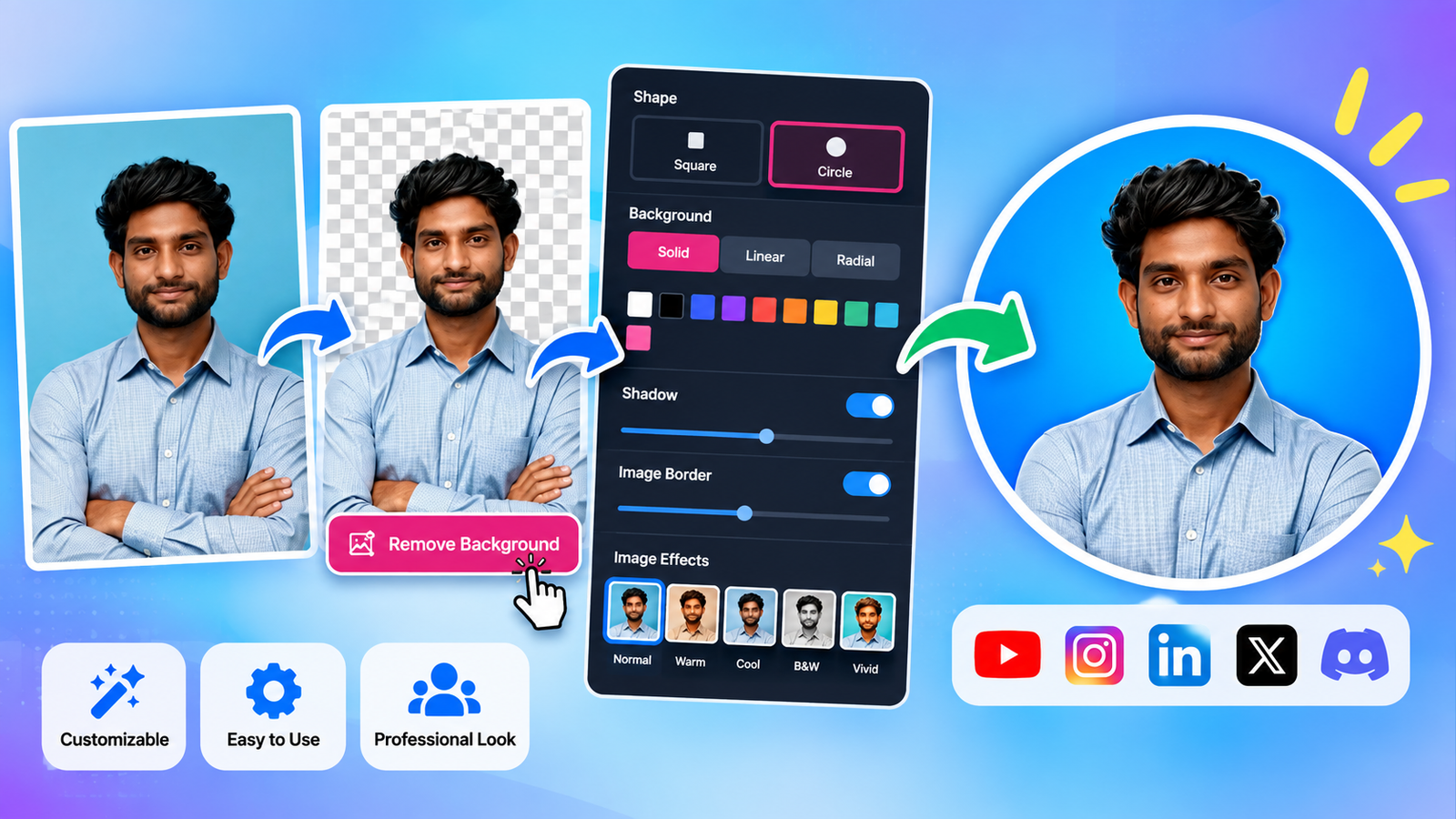
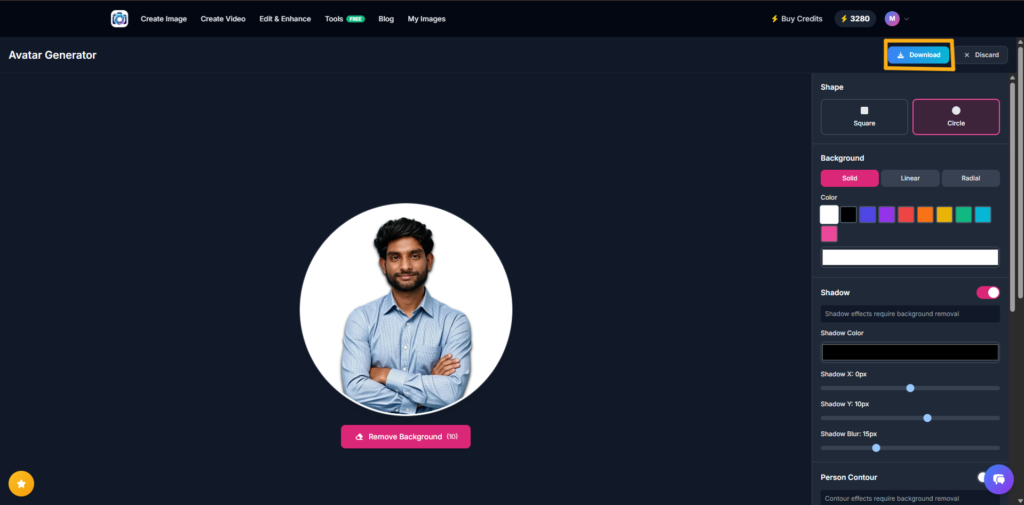
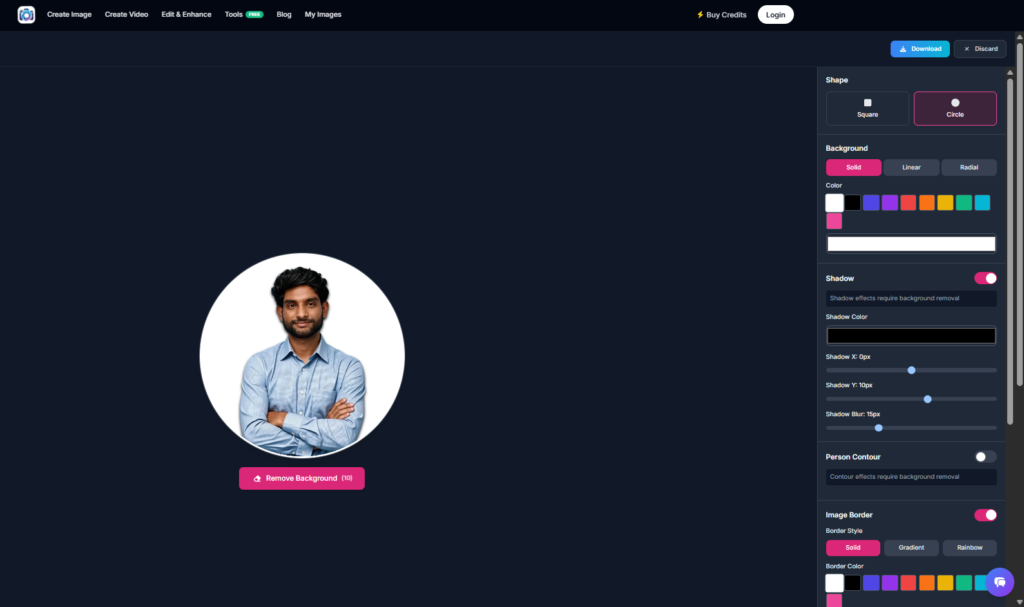
Photo AI Studio can be used to create and customize a profile avatar from an uploaded image through a visual avatar-generation workflow. For example, you can upload a portrait, remove its background, choose a circular shape, customize the background, add a shadow or border, adjust positioning, and apply filters.
Step 1: Open Photo AI Studio and Upload Your Photo
First, open Google and search for “Photo AI Studio.” Then, click the official Photo AI Studio website to get started.
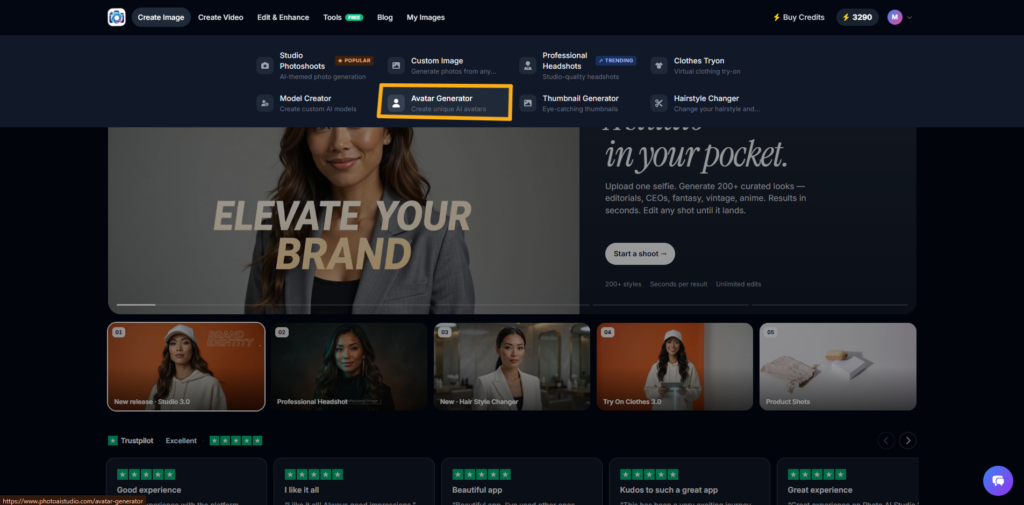
Next, locate the Avatar Generator and choose an image from your gallery or upload a new image. For this tutorial, select Upload and choose your reference photo.
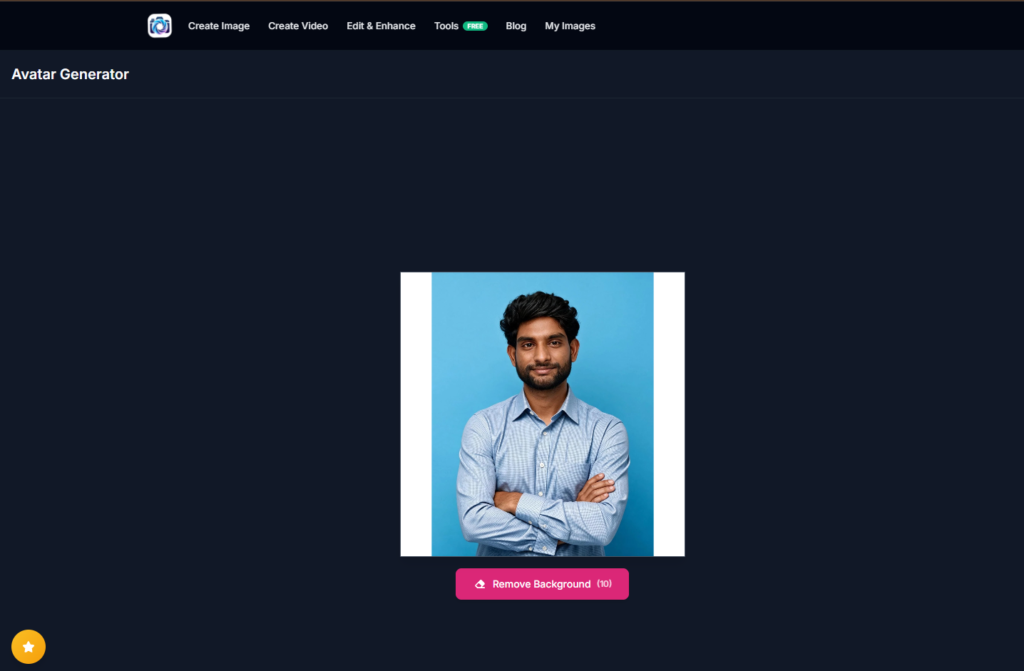
Step 2: Remove the Original Background
Next, remove the original background if it does not fit your desired avatar style. Photo AI Studio provides a Remove Background option below the uploaded image.
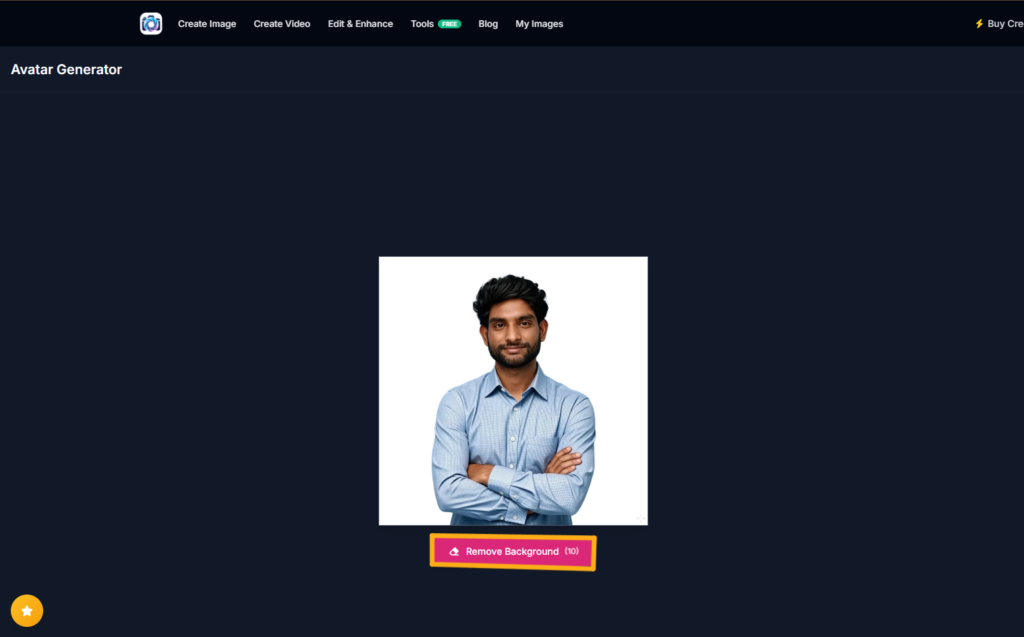
For example, if your original image has a blue wall, crowded room, or distracting objects behind you, removing the background can create a cleaner profile image.
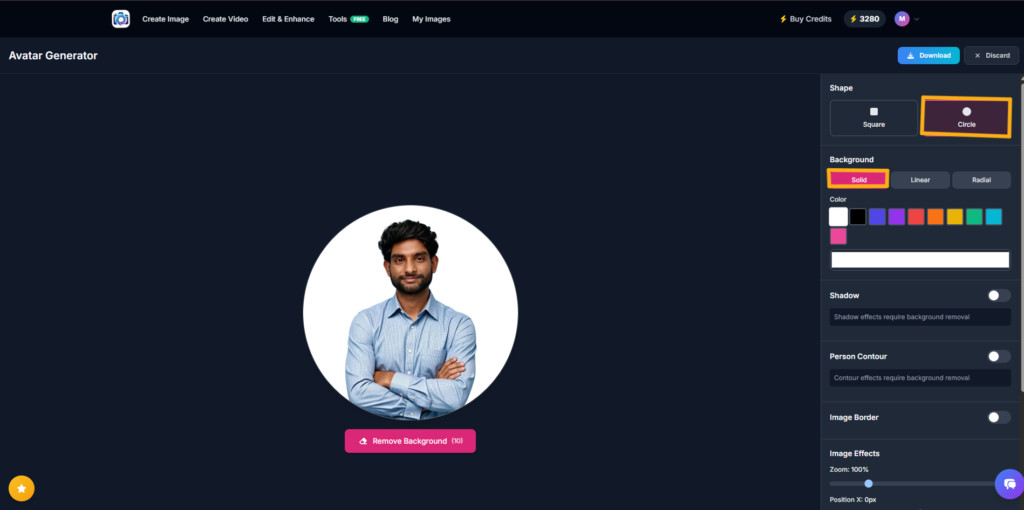
Step 3: Choose the Avatar Shape and Background
Then, use the Shape section to choose between Square and Circle. For social profile images, a Circle can create a clean and familiar profile-avatar appearance.
Next, customize the background using Solid, Linear, or Radial options. For example, a simple solid background can keep attention focused on the face.
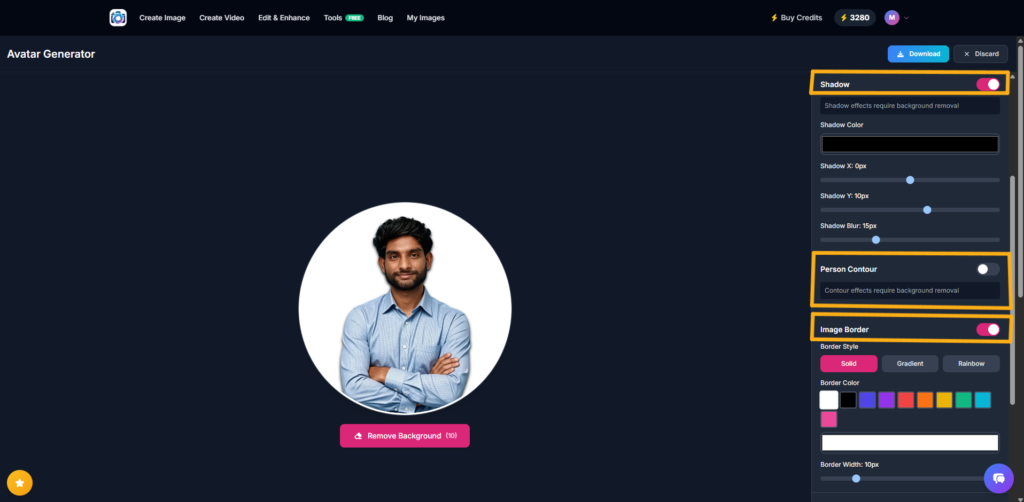
Step 4: Customize Shadows, Contours, and Borders
After that, enable Shadow if you want more separation between the subject and background. You can customize the shadow color, horizontal position, vertical position, and blur.
Next, consider the Person Contour option. You can leave it disabled for a natural appearance or experiment with it when you want stronger subject separation.
Then, use Image Border to add a border around your avatar. A subtle border can help the profile image stand out against websites and social-media interfaces.
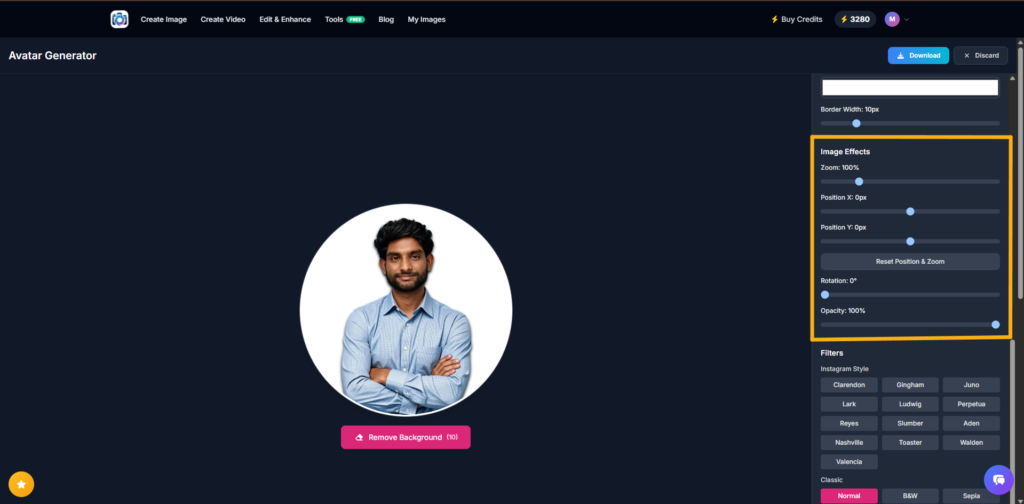
Step 5: Adjust Zoom, Position, Rotation, and Opacity
Next, open Image Effects to refine the composition. Zoom controls how large the person appears, while Position X and Position Y control horizontal and vertical placement.
For example, increasing the zoom slightly can make your face more recognizable when the avatar appears as a small circular icon.
Moreover, Rotation controls the image angle, while Opacity controls transparency. Keeping opacity at 100% normally produces the clearest profile avatar.
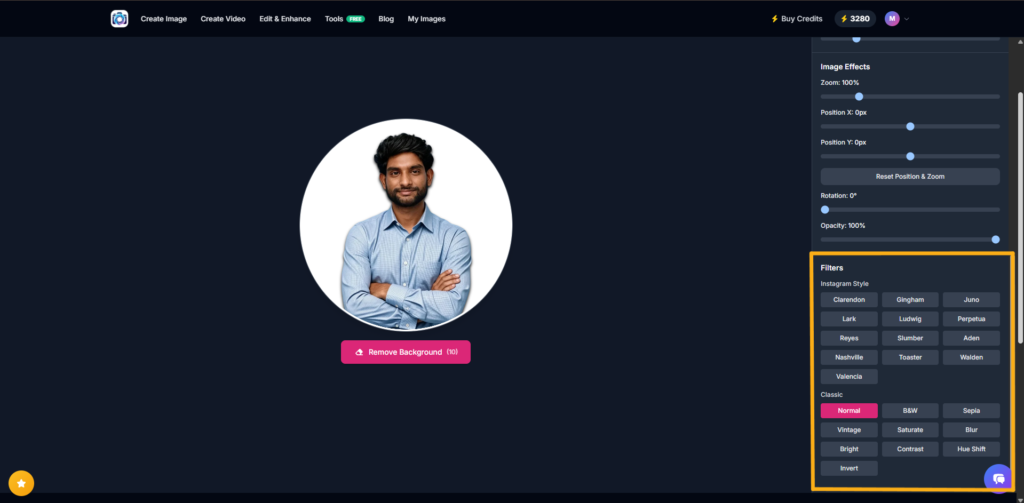
Step 6: Apply a Filter and Download the Avatar
Finally, experiment with Photo AI Studio’s available filters. The Instagram Style and Classic categories provide different visual treatments.
For example, choose Normal under Classic when you want a clean and natural appearance rather than a heavily stylized effect.
Once the avatar looks right, click Download and save the finished image for your social profile, YouTube channel, website, portfolio, or online community.
What Makes a Good Profile Avatar?
A good profile avatar uses a clear subject, recognizable features, appropriate composition, and enough visual contrast to remain identifiable at small sizes. For example, a face that is sharply visible against a simple background will usually work better as a small profile icon than a full-body image in a busy scene.
Moreover, check these elements before publishing:
- Recognizable face: Keep important facial features visible.
- Clear composition: Avoid unnecessary objects around the subject.
- Appropriate lighting: Make sure the face is easy to see.
- Simple background: Reduce visual distractions.
- Strong contrast: Separate the subject from the background.
- Consistent style: Match the avatar with your wider online identity.
- High resolution: Start with a sufficiently detailed source image.
A good profile avatar should remain recognizable even when displayed as a small icon.
What Is the Best Profile Avatar Style for Social Media?
The best social media profile avatar is a recognizable and distinctive image that matches the personality of the account. For example, creators can use expressive portraits, colorful illustrations, or recognizable AI-generated characters to make their profiles easier to identify.
Furthermore, platform audiences differ, so one style does not work everywhere. Pew Research Center’s 2025 survey found that 50% of U.S. adults use Instagram, while 37% use TikTok and 32% use WhatsApp — Source: Pew Research Center, 2025.
For example, a professional creator might use a polished portrait on LinkedIn but a more expressive branded avatar on Instagram or a gaming platform.
What Is the Best Profile Avatar Style for a Professional Profile?
The best professional profile avatar is clean, approachable, current, and visually consistent with your professional identity. For example, a consultant can use a realistic portrait with a simple background rather than an exaggerated cartoon effect.
Moreover, your avatar should match your industry and audience. A designer may have more freedom to use a creative visual style, while a financial professional may benefit from a restrained and trustworthy appearance.
By keeping the face clear and the background simple, you can make a professional avatar look polished without making it appear artificial.
Can You Use an AI-Generated Avatar Instead of a Real Profile Photo?
An AI-generated avatar can replace a traditional profile photo when the platform, audience, and purpose allow a stylized or generated identity. For example, creators, gamers, community members, and privacy-conscious users may prefer an avatar instead of publishing a conventional photograph.
At the same time, professional contexts may benefit from authenticity and recognizability, so consider whether your audience expects to see your actual appearance.
In addition, AI-generated images should not misrepresent another person or create a deceptive identity. Use your own photos, authorized assets, or clearly fictional concepts when creating avatars.
What Size and Format Should a Profile Avatar Be?
A profile avatar should generally be exported as a high-resolution square image because many platforms crop profile images into circles or other shapes. For example, starting with a square canvas gives you flexibility when the platform automatically crops the image.
Moreover, PNG and JPEG are practical formats for most profile-avatar uses. PNG can be useful when transparency is required, while JPEG is often convenient for photographic images.
Before uploading, check the platform’s current image requirements because recommended dimensions, file-size limits, and cropping behavior can change over time.
How Can You Make Your Profile Avatar Look More Professional?
A professional profile avatar combines clear facial visibility, controlled composition, appropriate styling, and a background that supports the subject. For example, a clean background, natural expression, and balanced crop can make an ordinary portrait look significantly more polished.
Next, avoid common mistakes such as:
- Using an outdated photograph.
- Choosing a low-resolution image.
- Cropping the face too tightly.
- Using an overly busy background.
- Applying too many filters.
- Changing your visual identity too frequently.
You can learn how virtual clothes try-on works and how AI can help you visualize different outfits before you buy or wear them.
Where Can You Use a Profile Avatar?
A profile avatar can be used across social media, professional networks, messaging apps, gaming accounts, forums, websites, portfolios, and personal-brand channels. For example, one recognizable avatar can create consistency between a personal website and several social profiles.
Common uses include:
- Social media profiles
- LinkedIn and professional networks
- YouTube creator accounts
- Messaging applications
- Gaming profiles
- Online communities
- Forums
- Personal websites
- Freelance portfolios
- Business and creator brands
Create realistic virtual models with AI and explore new ways to enhance your photos and creative projects.
For businesses, a branded avatar can also support a recognizable visual identity. For example, a founder can use a professional avatar while a fictional brand mascot represents the company across community platforms.
What Tools Can You Use to Create a Profile Avatar?
Profile avatar creation can use anything from a smartphone camera and basic editing software to dedicated AI avatar generators. For example, you can take a clear portrait with your phone, crop it with a free editor, or use Photo AI Studio for more customized avatar styling.
Free or accessible alternatives can include Canva, basic smartphone editing tools, and platform-native profile-image editors. AI-focused tools become more useful when you want multiple styles or faster experimentation.
For Photo AI Studio specifically, the workflow can include uploading a photo, removing the background, choosing a shape, customizing the background, adjusting effects, applying filters, and downloading the final avatar.
What’s Next: How Should You Optimize Your Profile Avatar?
Optimizing a profile avatar means selecting the strongest version for your platform, audience, and intended impression. For example, an avatar that looks excellent at full size may become unclear when reduced to a small social-media icon.
Next, use this final checklist:
- Choose your platform.
- Decide the impression you want to create.
- Select a suitable avatar style.
- Create several variations.
- Test each version at small size.
- Choose the clearest and most recognizable option.
- Use consistent visual branding across relevant platforms.
Moreover, review your avatar periodically rather than keeping the same image forever. A profile avatar should represent your current identity, style, and purpose.
Frequently Asked Questions (FAQs)
Q1: What is a profile avatar?
A: A profile avatar is a visual image that represents a person, brand, character, or identity online. It can be a real photograph, AI-generated portrait, cartoon, illustration, 3D character, or branded image.
Q2: What is the difference between a profile avatar and a profile picture?
A: A profile picture is usually any image used to identify an online account, while a profile avatar can specifically refer to a stylized, illustrated, fictional, or AI-generated representation. In everyday use, the two terms are often interchangeable.
Q3: How do I make a profile avatar?
A: You can make a profile avatar by choosing its purpose, selecting a reference photo or concept, choosing a visual style, generating or editing the image, and exporting the final version. AI avatar generators can simplify this process for beginners.
Conclusion
A profile avatar is more than a decorative image because it serves as a visual representation of your online identity. Whether you choose a realistic AI portrait, professional avatar, cartoon character, 3D design, or branded image, the strongest option is the one that remains recognizable and fits your audience.
Ultimately, creating an effective avatar does not require advanced photography or graphic-design skills. With a clear reference image, a suitable visual style, and an AI-powered workflow such as Photo AI Studio, you can create and refine multiple profile-avatar concepts quickly.
Start with one clear idea, experiment with several variations, and choose the avatar that best represents you.
Written by: Muthumanickam — SEO and Content Specialist with 5+ years of experience in SEO, content creation across different platforms, blogging, and affiliate marketing.