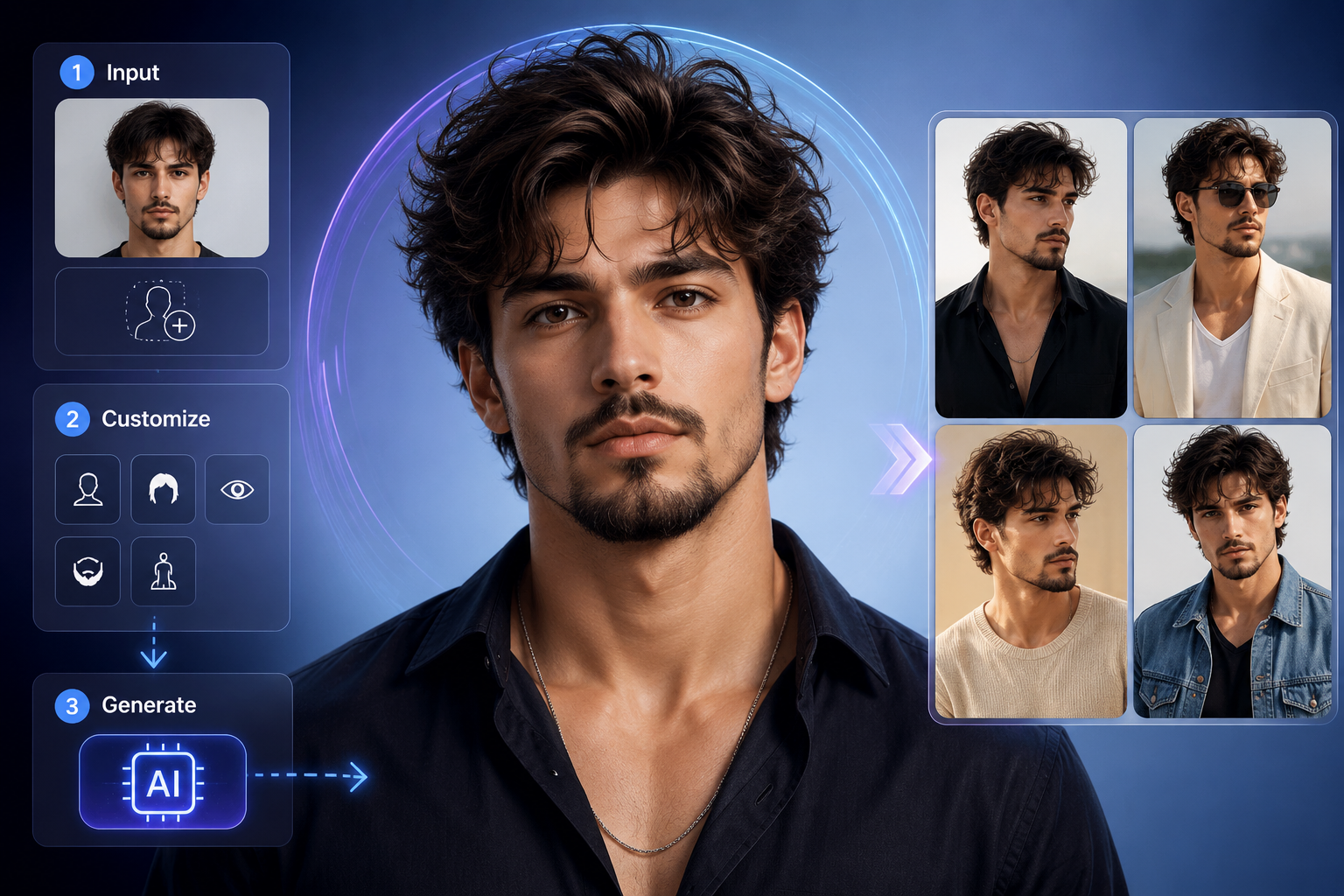
You’ve probably already seen AI generate realistic people from a simple prompt or reference image. However, creating one convincing picture is different from building a consistent AI model that can appear in different outfits, poses, locations, and scenes. In this guide, we’ll explain what an AI Model Creator is, how it works, how to create an AI model step by step, and how to keep your results consistent.
Key Takeaways
- AI model creators generate digital people or model images from text prompts, reference images, or other visual instructions.
- AI-generated models can be customized through appearance, clothing, hairstyle, pose, background, lighting, and visual style.
- Model creation starts with a clear concept and a suitable prompt or reference image.
- Detailed prompts help control important elements such as appearance, outfit, pose, lighting, and composition.
- Visual consistency requires repeatable references and prompts that preserve important characteristics across generations.
- AI models can support social media, fashion, marketing, e-commerce, and creative-content workflows.
- Prompt refinement helps you create better results and build a repeatable AI model workflow.
What Is an AI Model Creator and How Does It Work?
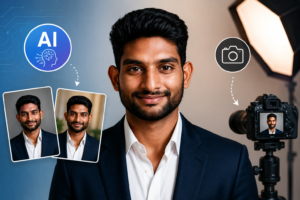
An AI Model Creator is a tool or system that generates digital people or model images using inputs such as text prompts, reference images, or other visual instructions. These tools use generative AI to produce images based on the characteristics, appearance, and visual direction you provide.
For example, instead of hiring a photographer and model to create a fashion concept, you can describe a 38-year-old male model with tan skin, dark-brown long hair, a lean build, and a confident expression and generate a visual concept.
Moreover, an AI Model Creator should not be confused with a machine-learning model builder. A machine-learning model creator typically involves training or configuring an AI system, while an AI person generator creates visual representations of people.
For example, a developer may train a machine-learning model to classify images, whereas a content creator can use an AI model generator to create a fictional fashion model.
Additionally, AI-generated people are increasingly becoming part of creative workflows because image-generation tools can support ideation, creation, and editing. HubSpot reported that 43% of surveyed marketers identified content creation as a top generative-AI use case, including creating images and other content — Source: [HubSpot, 2025].
You can also generate AI photos using text prompts or reference images, giving you more control over the final look and style.
Why Does an AI Model Creator Matter?
An AI Model Creator matters because it can help you produce customizable people and visual concepts without arranging a traditional photoshoot for every idea. The biggest advantage is flexibility: you can experiment with different appearances, outfits, environments, and compositions before deciding what works.
For example, an e-commerce seller could create a consistent virtual model wearing several clothing styles, while a social media manager could develop different lifestyle scenes around the same fictional character.
Furthermore, AI-generated models can support faster visual experimentation for marketing and content teams. Adobe reported that 86% of marketing leaders expected generative AI to significantly increase content speed and volume in its 2025 AI and Digital Trends research — Source: [Adobe, 2025].
At the same time, AI-generated models do not automatically replace photography, human creativity, or professional judgment. Instead, they provide another production option when you need concept visuals, variations, or fictional characters.
For example, you can use a generated model for an early advertising concept and later replace it with a professional photoshoot if the campaign requires a real person.
What Types of AI Models Can You Create?
An AI Model Creator can produce many types of digital people, from fashion models and professional characters to fictional social media personalities. The exact options depend on the tool, but appearance, clothing, pose, environment, and visual style can often be customized.
| AI model type | Example use | Customizable elements |
|---|---|---|
| Fashion model | Clothing concepts | Outfit, pose, location |
| Lifestyle model | Social media | Expression, scene, activity |
| Professional model | Business visuals | Clothing, background, lighting |
| Product model | E-commerce | Product interaction, pose |
| Virtual influencer | Social content | Identity, style, environment |
| Fictional character | Creative projects | Appearance, costume, setting |
Moreover, AI fashion models can help creators visualize clothing concepts without repeatedly organizing studio sessions. For example, a designer could test a leather jacket, formal blazer, or casual streetwear concept on the same digital character.
In addition, virtual characters can be designed around specific creative identities. A fictional model might consistently use a particular hairstyle, clothing aesthetic, facial expression, and photography style.
How Do You Create an AI Model Step by Step?
Creating an AI model involves defining the model’s appearance and style, providing a suitable prompt or reference image, generating an image, and refining the result until it matches the desired characteristics. You do not need advanced machine-learning knowledge when using an accessible AI image-generation tool.
1. Define the AI Model Concept
First, define who your model is before generating an image. Decide on characteristics such as approximate age, gender, appearance, personality, clothing style, and intended use.
For example, your concept could be: a 38-year-old Caribbean male model with tan skin, brown eyes, dark-brown long hair, a lean build, and a confident smile.
By defining these characteristics first, you create a visual identity that can guide later generations.
2. Choose a Prompt or Reference Image
Next, choose whether your workflow will rely mainly on text instructions, a reference image, or both. Reference images can provide visual guidance, while prompts give you precise control over the desired scene.
For example, a reference image can establish facial or visual characteristics, while your prompt can describe a leather jacket, outdoor location, cinematic lighting, and a specific pose.
3. Describe the Model’s Appearance
Then, describe the characteristics that should remain recognizable across generations. Include details such as hairstyle, hair color, eye color, skin tone, facial hair, age range, and body build.
For example, instead of writing “a handsome man,” specify “a 38-year-old man with tan skin, brown eyes, long dark-brown messy hair, a lean build, and a Van Dyke beard.”
4. Generate and Review the Result
After that, generate the first model and inspect the result carefully. Look for facial consistency, realistic anatomy, hands, clothing details, lighting, and whether the generated image follows your instructions.
For example, if the model has the correct hairstyle but the wrong body build, change that specific instruction instead of rewriting the entire prompt.
5. Refine and Generate More Scenes
Finally, refine the successful characteristics and reuse them when creating additional images. This approach helps turn a single AI-generated person into a reusable digital model.
For example, keep the model identity consistent while changing the scene from a studio portrait to a beach, city street, office, or fashion runway.
How Do You Create an AI Model From a Reference Image?
Creating an AI model from a reference image involves using an existing visual as guidance for the generated person’s appearance or identity. A clear, well-lit reference usually provides better visual information than a blurry or heavily obstructed image.
For example, a front-facing portrait with visible facial features can give an image-generation system clearer information than a distant photograph.
Moreover, reference images work best when you separate identity characteristics from scene characteristics. Keep the model’s face, hairstyle, and general appearance stable while changing clothing, location, pose, and lighting.
For example, the same reference can support a professional headshot, casual streetwear image, and editorial fashion scene.
You can learn how to create a professional headshot with AI using simple prompts and reference images.
How Do You Write Prompts for an AI Model Creator?
An effective AI model prompt describes the person, clothing, pose, lighting, camera perspective, background, mood, and overall image style. Specific instructions generally give you more control than vague descriptions.
For example, a useful prompt structure is:
A 38-year-old Caribbean male model, tan skin, brown eyes, long dark-brown messy hair, lean build, Van Dyke beard, confident smile, wearing a black leather jacket, standing outdoors in a modern urban setting, soft natural light, realistic editorial photography, medium portrait, shallow depth of field.
Additionally, you can organize prompts into these components:
- Identity: age, gender, ethnicity, facial characteristics
- Appearance: eyes, hair, skin tone, facial hair
- Clothing: jacket, shirt, dress, accessories
- Pose: standing, sitting, walking, looking at camera
- Environment: studio, street, beach, office
- Lighting: natural, soft, dramatic, studio
- Camera: portrait, close-up, full body, wide shot
- Style: realistic, editorial, cinematic, commercial
How Do You Create Consistent AI Model Images?
Consistent AI model creation requires repeatable references and prompts that preserve important visual characteristics across multiple generated images. Consistency matters because changing too many identity attributes can make the person look like a completely different character.
For example, if your first image uses long dark-brown hair and a lean build, suddenly switching to short blonde hair and a muscular build can substantially change the model’s visual identity.
Moreover, maintain a model identity sheet containing the characteristics you want to preserve:
- Age range
- Facial characteristics
- Hair color and hairstyle
- Eye color
- Skin tone
- Body build
- Facial hair
- Preferred visual style
At the same time, change only one major variable when testing new generations. For example, keep the face and clothing constant while changing the background first, then test a different pose.
What Makes an AI-Generated Model Look Realistic?
A realistic AI-generated model combines believable facial features, anatomy, skin texture, lighting, proportions, clothing details, and photographic composition. Realism depends on the entire image rather than a single prompt keyword.
For example, a realistic portrait should have natural-looking eyes, believable skin texture, coherent shadows, properly positioned clothing, and lighting that matches the environment.
Furthermore, professional-looking composition can improve perceived realism. Adobe’s 2026 research found that nearly nine in ten surveyed creative professionals said generative AI had improved their work, illustrating how AI is increasingly being integrated into creative workflows — Source: [Adobe, 2026].
What Can You Use AI-Generated Models For?
AI-generated models can be used for visual-content workflows such as social media posts, fashion concepts, marketing materials, e-commerce imagery, and creative projects. Their usefulness comes from the ability to create multiple visual scenarios around a defined character.
For example, marketers can create campaign concepts, while fashion creators can test different outfits and editorial environments.
“HubSpot’s 2025 social media research found that a significant share of marketers now rely on visual AI tools — including image, video, and design generators — to produce social media content — Source: [HubSpot, 2025].”
Common applications include:
- Social media content: Create lifestyle posts and visual campaigns.
- Fashion concepts: Test outfits, poses, and editorial settings.
- E-commerce: Visualize products with digital models.
- Advertising concepts: Explore campaign directions before production.
- Website visuals: Create branded people and lifestyle imagery.
- Creative projects: Build fictional characters and visual stories.
You can also explore this virtual clothes try-on guide to learn how to preview different outfits on your photos using AI.
Which Tools Can You Use to Create AI Models?
AI model creation tools should provide controls for appearance, references, image generation, and refinement so users can create and reuse a recognizable digital character. Photo AI Studio is one example of an accessible AI photo platform that includes a Model Creator workflow.
How to Create an AI Model With Photo AI Studio

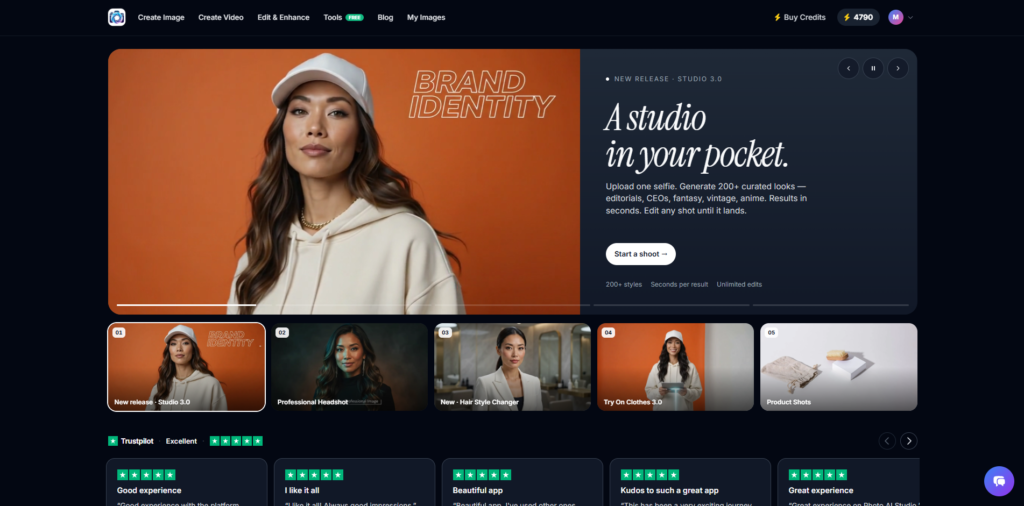
First, open Google and search for “Photo AI Studio,” then select the official Photo AI Studio website. From the top navigation, choose Create Image to access the available image-generation tools.
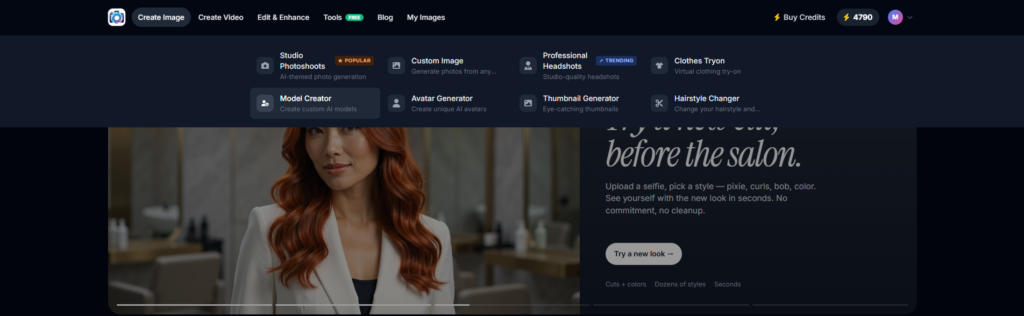
Next, select Model Creator from the available AI image tools. The interface also includes options such as Studio Photoshoots, Custom Image, Professional Headshots, Clothes Try-On, Avatar Generator, Thumbnail Generator, and Hairstyle Changer.
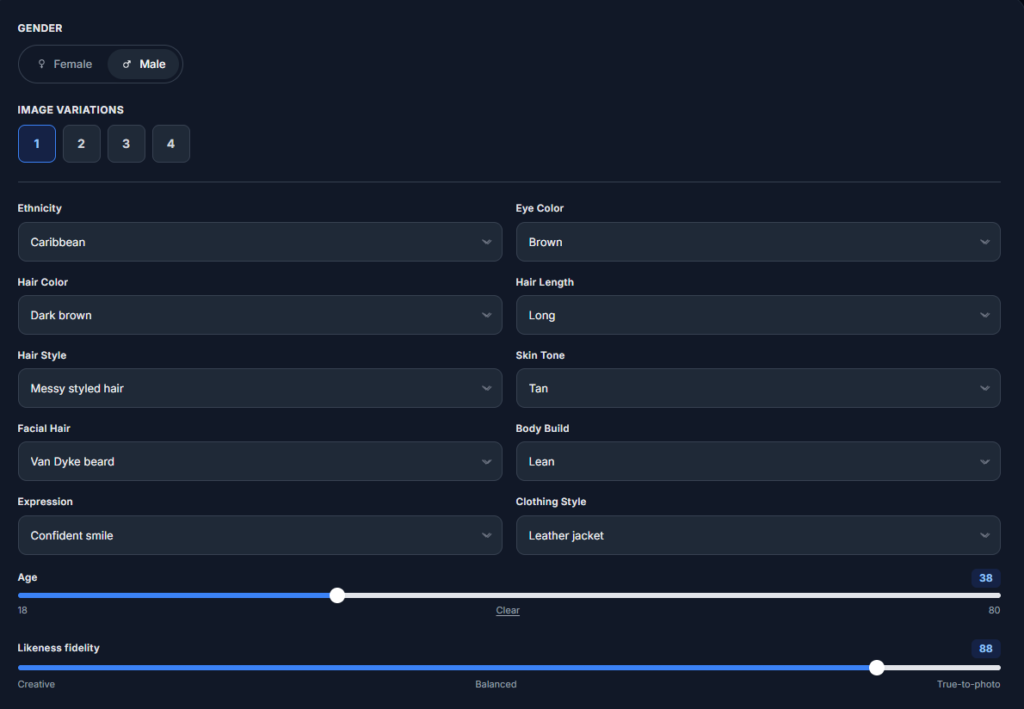
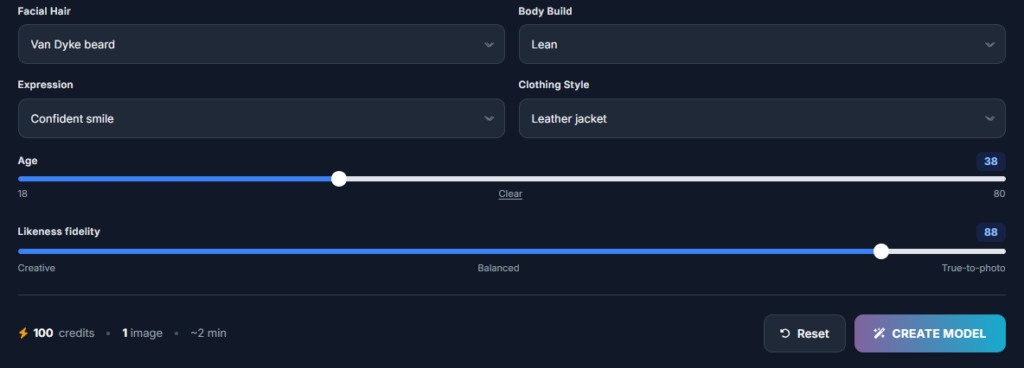
First, select Male under the Gender option.
- Gender: Select Male.
- Image Variation: Choose Variation 1.
- Ethnicity: Select Caribbean.
- Eye Color: Choose Brown.
- Hair Color: Select Dark Brown.
- Hair Length: Choose Long.
- Hair Style: Select Messy styled hair.
- Skin Tone: Choose Tan.
- Facial Hair: Select Van Dyke beard.
- Body Build: Choose Lean.
- Expression: Select Confident smile.
- Clothing Style: Choose Leather jacket.
- Age: Set the age to around 38.
- Likeness Fidelity: Set the value to around 88.
Moreover, the model’s identity becomes easier to manage when you choose each characteristic deliberately rather than relying entirely on random generation. The goal is to create a clear character concept that you can reproduce across future images.
After configuring the characteristics, choose Create Model. Photo AI Studio then processes the selected settings and generates an AI model based on those characteristics.
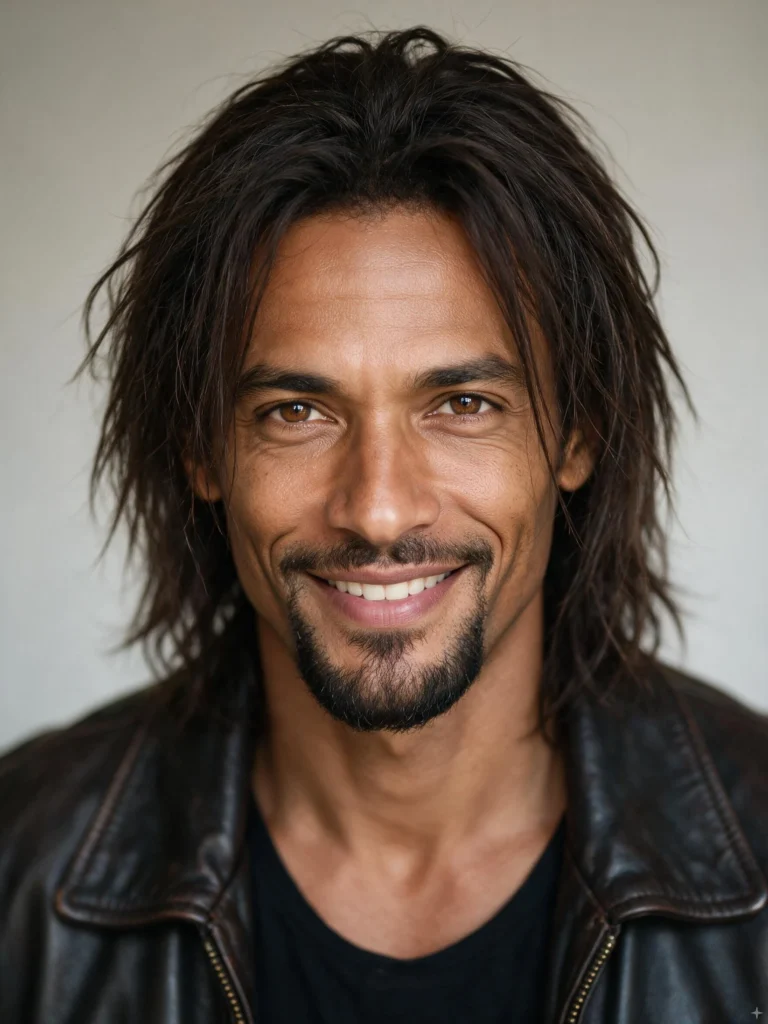
Additionally, Photo AI Studio describes its broader workflow around uploading an image, selecting a style, generating the result, and downloading or sharing the output.
For fairness, other AI image-generation platforms can also support text-to-image or reference-based workflows. The best choice depends on the controls you need, the type of model you want to create, image quality, consistency features, editing options, and your budget.
How Can You Improve an AI-Generated Model?
Improving an AI-generated model requires reviewing the output, identifying the biggest visual problem, and changing only the instructions needed to fix it. Iterative refinement is usually more effective than changing every setting at once.
For example, if the face looks correct but the lighting feels artificial, keep the identity description and change only the lighting instruction.
Moreover, save successful prompts and settings as you work. A simple prompt library can help you reproduce a model’s appearance across future images.
Is It Possible to Create Multiple Images of the Same AI Model?
Yes, it is possible to create multiple images around the same AI model, but maintaining visual consistency depends on the generation tool, references, prompts, and settings you use. The more carefully you preserve important identity characteristics, the easier it becomes to build a recognizable character.
For example, you can keep the same model identity while generating a studio portrait, outdoor lifestyle image, fashion editorial, and professional business scene.
Additionally, Adobe’s 2025 creator research found that 60% of surveyed creators had used more than one creative generative-AI tool during the previous three months, showing that creators often combine different tools for different stages of their workflows — Source: [Adobe, 2025].
What’s Next After Creating an AI Model?
The next step after creating an AI model is to build a repeatable library of scenes, outfits, poses, and successful prompts around the same visual identity. This turns one generated image into a reusable content system.
First, create several variations of the same model in controlled environments. For example, generate a studio portrait, casual lifestyle scene, professional office image, and fashion editorial.
Next, organize your successful prompts and settings. Keep notes about the model’s appearance, preferred camera style, lighting, clothing, and reference images.
Finally, test different applications based on your goals. For example, an e-commerce seller can focus on product imagery, while a social media creator may prioritize lifestyle scenes and vertical compositions.
Frequently Asked Questions (FAQs)
Q1: What is an AI Model Creator?
A: An AI Model Creator is a tool that helps you create realistic digital models using customizable AI-generated characteristics. You can select details such as gender, ethnicity, eye color, hairstyle, skin tone, body build, clothing, age, and expression.
Q2: How do you use an AI Model Creator?
A: You can use an AI Model Creator by selecting your preferred model characteristics and generating an image. For example, you can choose a male model, select brown eyes, long dark-brown hair, tan skin, a lean build, and a leather jacket before generating the model.
Q3: Can an AI Model Creator create realistic models?
A: Yes, an AI Model Creator can generate realistic-looking digital models based on the characteristics you select. Choosing detailed appearance settings and refining the generated result can help create a more natural-looking model.
Q4: What is likeness fidelity in an AI Model Creator?
A: Likeness fidelity is a setting that controls how closely the generated result follows the selected or referenced visual characteristics. The exact effect depends on the AI tool and the value you choose.
Conclusion
An AI Model Creator provides a practical way to generate customizable digital people without requiring advanced AI development skills. The strongest results come from combining a clear model concept, detailed prompts or references, deliberate generation settings, and consistent refinement.
Moreover, creating a convincing AI model is not only about generating one realistic image. The real goal is to build a recognizable visual identity that can work across multiple images, outfits, poses, and environments.
Finally, start with one simple character and refine it through iteration. By saving successful prompts, preserving key characteristics, and testing new scenes carefully, you can develop a repeatable workflow for AI-generated models, fashion concepts, marketing visuals, social media content, and creative projects.
Written by: Muthumanickam — SEO and Content Creator with 5+ years of experience in SEO, content creation across different platforms, blogging, and affiliate marketing.