
AI Tool technology has completely changed the way bloggers, marketers, and SEO professionals create high-ranking content. In the past, ranking on Google required hours of manual research, keyword analysis, competitor study, and content optimization. Today, tools like Frase AI simplify this entire process.
Instead of writing articles blindly and hoping they rank, I use an AI Tool strategy with Frase’s Optimize Existing feature to improve and optimize content that already exists. This method helps me analyze competitors, discover missing topics, improve SEO structure, and increase my content score.
In this guide, I will explain step-by-step how I use Frase AI’s Optimize Existing method to create SEO-optimized content that ranks on Google.
Step 1: Start a New Article in Frase AI
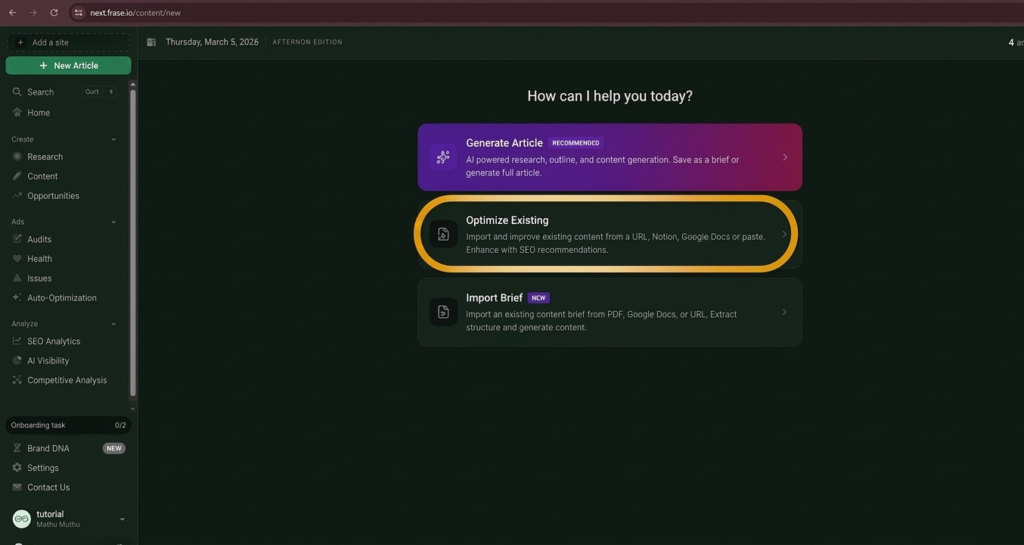
The first step in my process begins inside the Frase AI dashboard.
When I log in to the platform, I click “New Article”. Frase provides multiple content creation options, including:
- Generate Article
- Optimize Existing
- Import Brief
🔗Try Free Trial Here
For optimizing already written content, I select Optimize Existing.
This feature allows me to improve an article that I have already written instead of starting from scratch. It is especially useful for updating older blog posts that are not ranking well on Google.
By choosing this option, Frase prepares the system to analyze my content and compare it with top-ranking pages in search results.
Step 2: Import Existing Content for Optimization
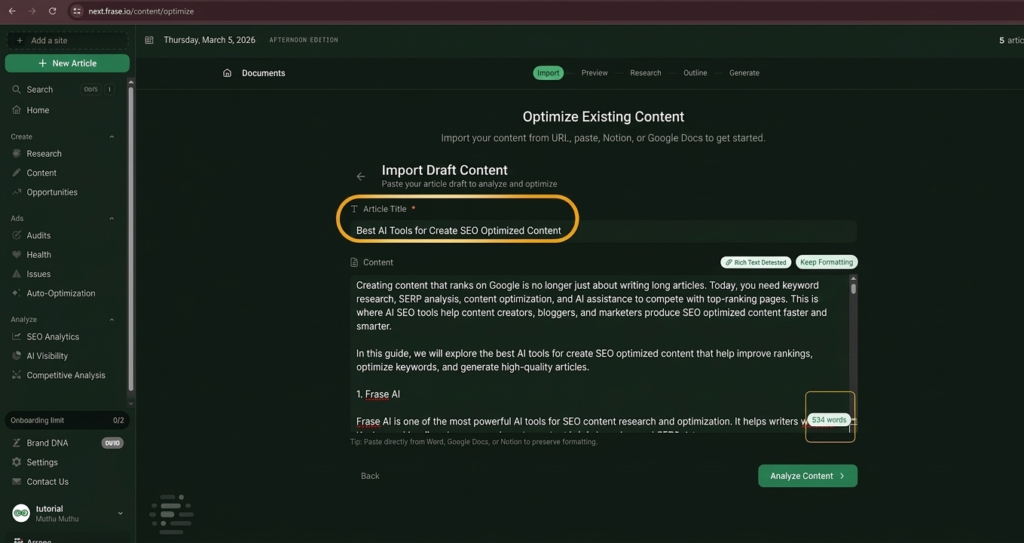
After selecting Optimize Existing, the next step is importing the article that I want to optimize.
Frase allows multiple import options:
- Paste content manually
- Import from a URL
- Import from Google Docs
- Import from Notion
In my workflow, I usually paste the article content directly into the editor.
For example, in the screenshots above, I pasted an article titled:
“Best AI Tools for Create SEO Optimized Content.”
Once the content is pasted, Frase automatically detects:
- Article title
- Headings structure
- Word count
- Content sections
At this stage, the system prepares the article for deeper SEO analysis.
Step 3: Analyze the Content
After importing the article, the next step is clicking the “Analyze Content” button.
This step is extremely important because Frase starts analyzing the article using SERP data from Google’s top-ranking pages.
The analysis includes:
- Content structure
- Heading organization
- Keyword coverage
- Topic relevance
- Competitor comparison
Frase also calculates an initial content score based on how well the article matches search intent.
This score helps identify whether the content needs improvements in areas such as:
- keyword usage
- missing sections
- poor structure
- incomplete topics
Once the analysis is completed, Frase moves to the next stage of optimization.
Step 4: Review Content Preview
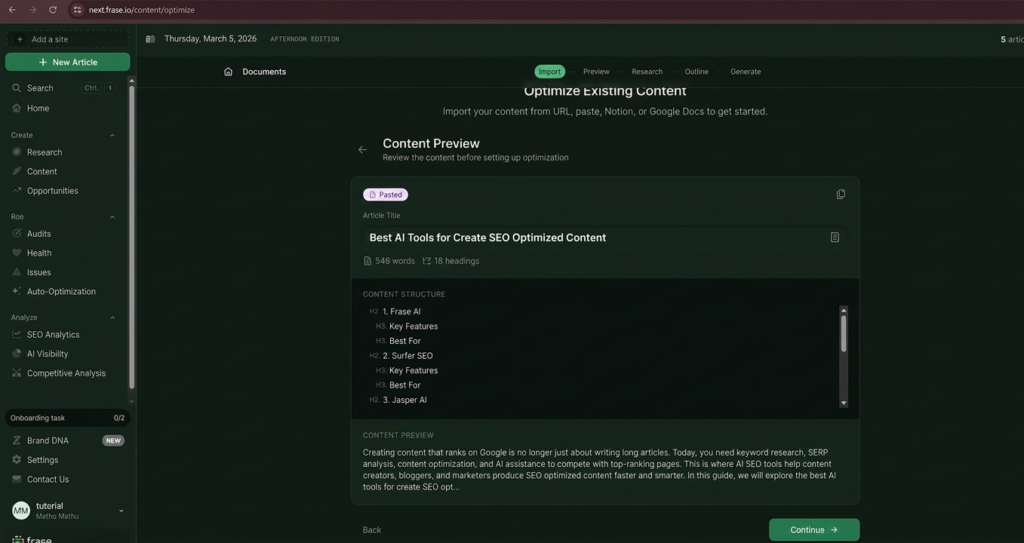
After the analysis, Frase shows a Content Preview screen.
This section displays the structure of the article, including:
- H2 headings
- H3 subheadings
- article length
- content structure
For example, the article may contain sections such as:
- Frase AI
- Surfer SEO
- Jasper AI
- Scalenut
- Outranking AI
This preview helps me understand how the article is currently structured before adding improvements.
If necessary, I can also adjust the content before continuing.
Step 5: Configure Optimization Settings
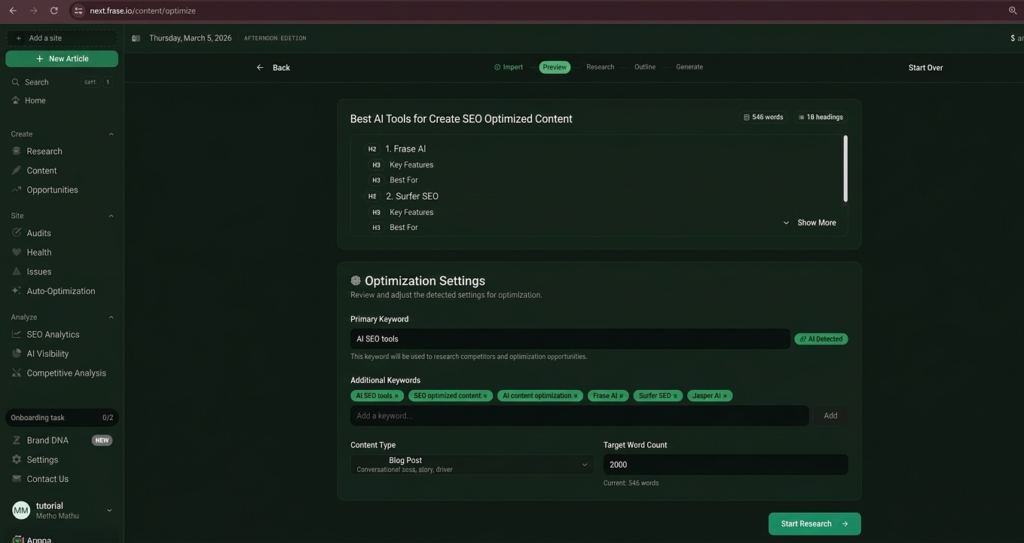
The next step involves Optimization Settings.
This is where Frase allows me to define the SEO focus of the article.
Important settings include:
Primary Keyword:
The primary keyword is the main topic of the article.
Example:
AI SEO tools
Frase automatically detects this keyword based on the content.
Additional Keywords:
Frase also suggests related keywords such as:
- SEO optimized content
- AI content optimization
- Surfer SEO
- Frase AI
- Jasper AI
These keywords help the article cover the topic more comprehensively.
Content Type:
I usually select:
Blog Post
Target Word Count:
Frase also recommends an ideal word count based on top competitors.
For example:
2000 words
After setting these parameters, I click Start Research.
Step 6: Use Frase AI Research Feature
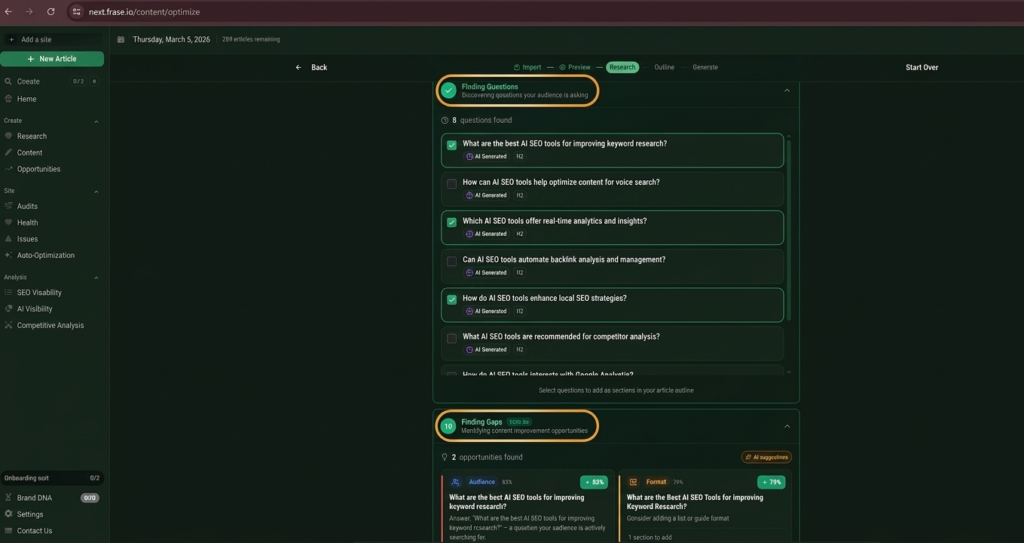
The research stage is where Frase becomes extremely powerful.
Frase automatically scans the top-ranking Google results for the selected keyword and extracts useful data.
This includes:
- People Also Ask questions
- commonly searched questions
- competitor headings
- content gaps
For example, the research section may show questions such as:
- What are the best AI SEO tools for improving keyword research?
- How can AI SEO tools help optimize content?
- Which AI SEO tools offer real-time analytics?
- How do AI SEO tools improve SEO strategy?
These questions are extremely valuable because they reflect real user search intent.
I usually select several of these questions to include in my article as subtopics.
This improves the chances of ranking for multiple keywords.
Step 7: Identify Content Gaps
Another powerful feature in Frase is Finding Gaps.
Content gaps represent topics that competitors cover but your article does not.
Frase highlights these opportunities and suggests improvements such as:
- adding new sections
- expanding existing paragraphs
- improving structure
- answering missing questions
For example, Frase may recommend adding sections like:
- Why Use AI Tools for SEO Content
- How to Choose the Best AI SEO Tool
- AI SEO tools for keyword research
By filling these gaps, the article becomes more comprehensive than competing pages.
Step 8: Build the Optimized Outline
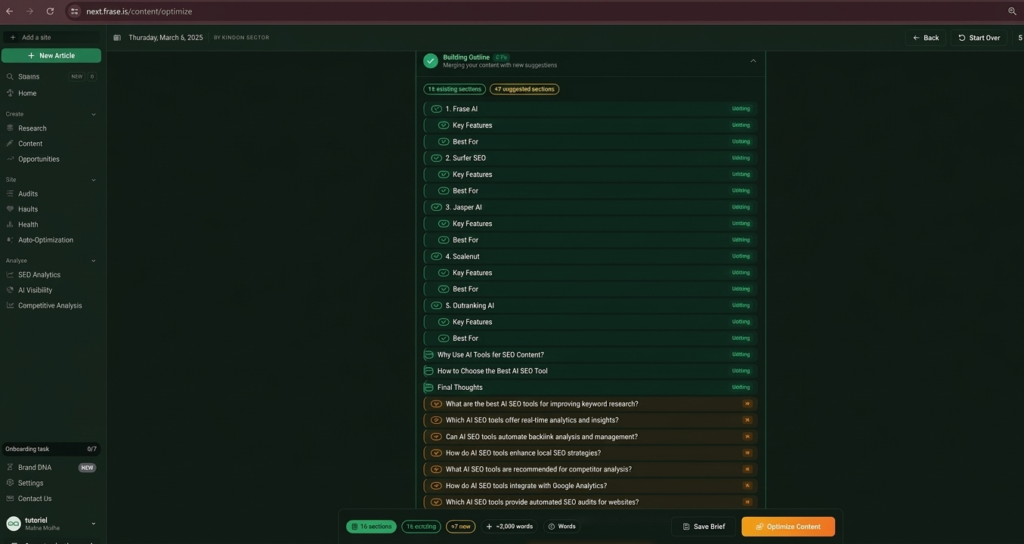
After research, Frase generates a new optimized outline.
This outline merges:
- your existing headings
- competitor topics
- AI suggestions
For example, the optimized outline may include:
- Frase AI
- Surfer SEO
- Jasper AI
- Scalenut
- Outranking AI
- Why Use AI Tools for SEO
- How to Choose the Best AI SEO Tool
- Final Thoughts
Frase also displays:
- number of sections
- estimated word count
- suggested additions
I review the outline and keep the sections that are most relevant to my content.
Step 9: Optimize the Content with AI
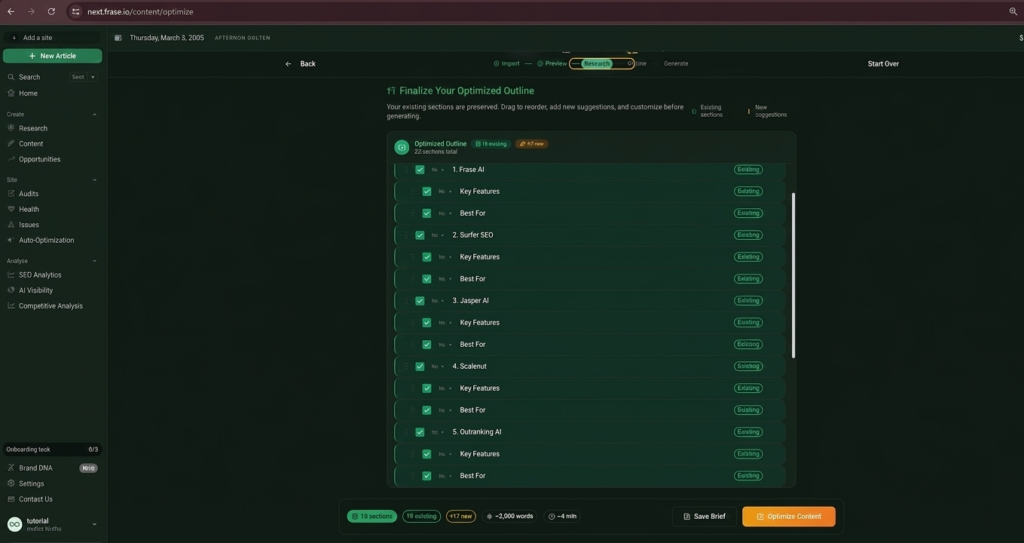
Once the outline is finalized, I click Optimize Content.
Frase then generates an optimized version of the article.
The system improves:
- content clarity
- topic coverage
- keyword usage
- SEO structure
This step is where the article transforms from a simple blog post into SEO-optimized content designed to rank on Google.
Step 10: Improve SEO Score
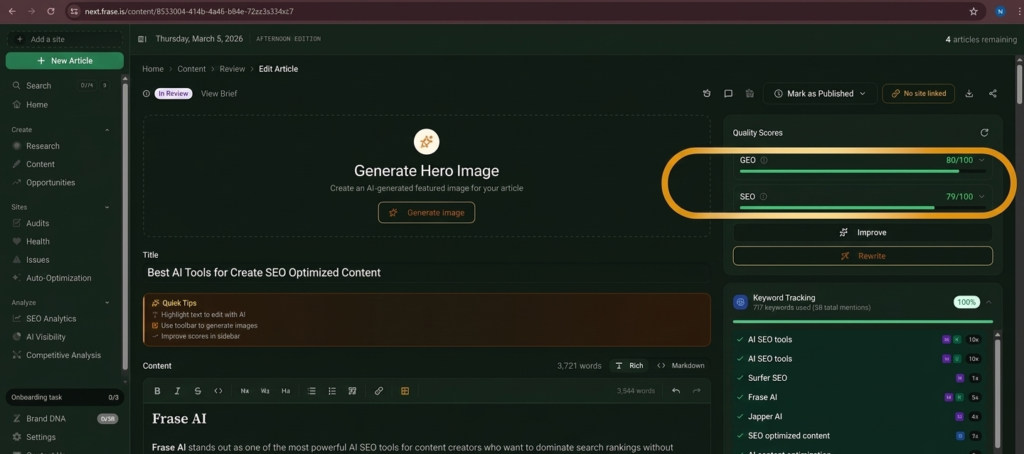
After optimization, Frase displays the SEO Quality Score.
This score measures how well the content is optimized.
Typical scoring categories include:
- readability
- structure
- keyword usage
- meta optimization
- definitions
- key takeaways
For example, the article may receive:
SEO Score: 79/100
Frase then provides suggestions to improve the score.
Step 11: Optimize Meta Title and Description
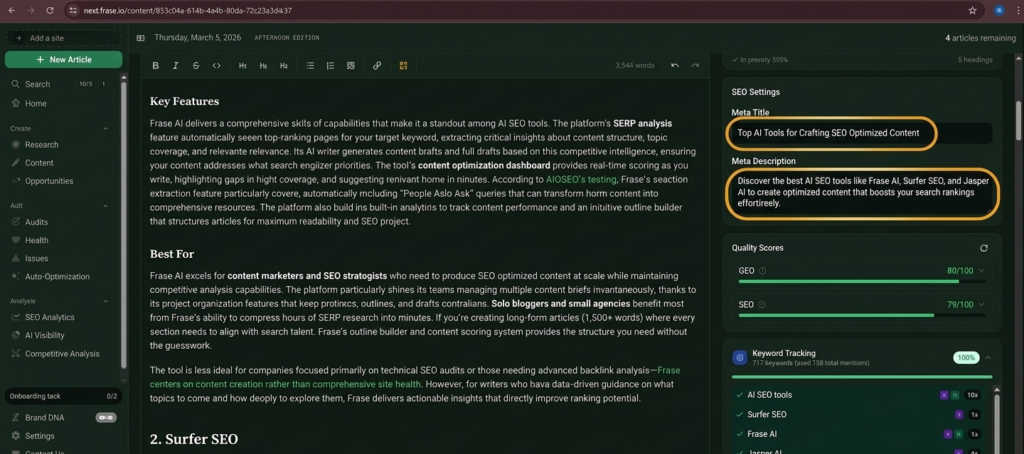
Another critical SEO step is optimizing metadata.
Frase allows editing:
- Meta Title
- Meta Description
Example Meta Title:
Top AI Tools for Crafting SEO Optimized Content
Example Meta Description:
Discover the best AI SEO tools like Frase AI, Surfer SEO, and Jasper AI to create optimized content that improves your search rankings.
These elements improve click-through rate in Google search results.
Step 12: Run Content Diagnostics
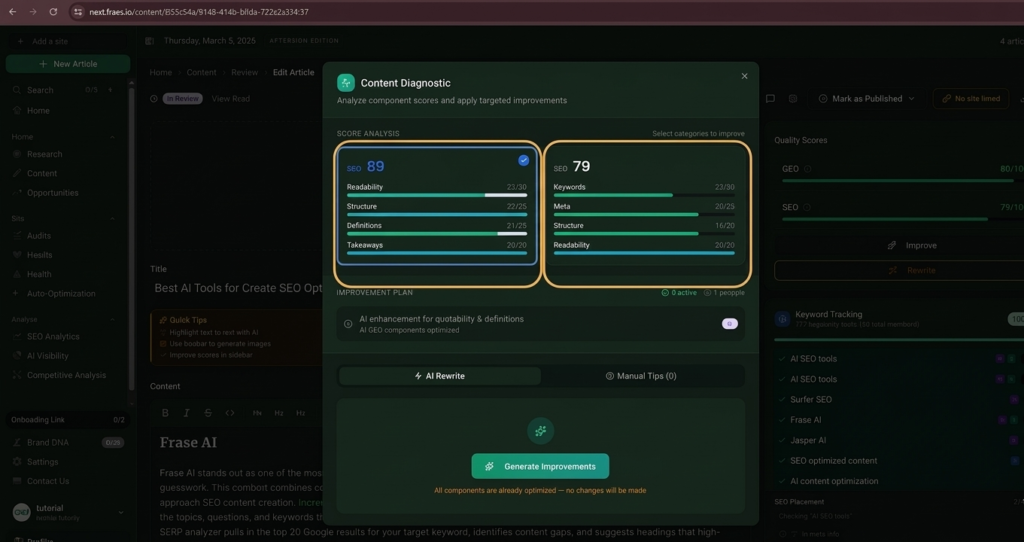
Frase also provides a Content Diagnostic tool.
This tool analyzes:
- keyword distribution
- article structure
- readability score
- content coverage
It shows a breakdown such as:
SEO score
Readability
Structure
Keyword optimization
If improvements are needed, Frase suggests adjustments.
Step 13: Use AI Rewrite for Improvements
Frase also includes an AI Rewrite feature.
This allows me to:
- improve paragraphs
- rewrite unclear sections
- expand content
- improve readability
Instead of manually rewriting content, I use AI suggestions to improve the article faster.
Step 14: Publish the Optimized Article
Once the content reaches a strong SEO score, the final step is publishing.
At this stage, the article is:
- SEO optimized
- keyword enriched
- competitor analyzed
- structurally improved
This significantly increases the chances of ranking on Google.
I Optimized Existing Content in 60 Seconds Using Frase AI (Step-by-Step Tutorial):
Why I Use Frase AI for SEO Content Optimization:
Frase AI offers several advantages compared to traditional SEO workflows.
Key Benefits:
- Automates SERP research
- Identifies content gaps
- Suggests optimized headings
- Improves keyword coverage
- Generates optimized outlines
- Provides SEO scoring
Because of these features, Frase saves hours of manual research time.
How I Use This AI Tool to Create SEO-Optimized Content That Ranks on Google (Using Generate Article Method)
FAQs – Frase AI
Q1: What is Frase AI?
👉Frase AI is an AI-powered SEO content optimization tool that helps writers research, structure, and optimize content based on Google search results.
Q2: How does Frase Optimize Existing work?
👉The Optimize Existing feature analyzes your existing article and compares it with top-ranking pages to identify improvements.
Q3: Is Frase AI good for SEO?
👉Yes. Frase AI helps improve keyword coverage, content structure, and topic relevance, which are essential for ranking on Google.
Q4: Can beginners use Frase AI?
👉Yes. The platform is beginner-friendly and provides clear suggestions for improving SEO content.
Q5: Does Frase replace manual SEO research?
👉Frase does not completely replace manual research but significantly speeds up the process.
Conclusion:
AI Tool strategies are transforming the way content creators approach SEO. Instead of relying on guesswork, tools like Frase AI allow bloggers and marketers to optimize their articles using real search data and competitor insights.
By using the Optimize Existing method, I can take an article that already exists and transform it into a well-structured, keyword-optimized, and SEO-friendly piece of content. From importing content to analyzing SERPs, identifying content gaps, building optimized outlines, and improving SEO scores, Frase provides a complete workflow for ranking content on Google.
For bloggers, affiliate marketers, and SEO professionals who want to publish high-quality content consistently, using an AI-powered optimization process can dramatically improve results.
are you ready to start using an AI Tool like Frase to turn your existing content into Google-ranking articles?