

If your blog posts are not ranking on Google—even after putting in hours of effort—you’re not alone. I faced the same problem until I started using an AI Tool that completely changed my content strategy.
In this detailed guide, I’ll show you exactly how I optimize existing content using the AI Tool Scalenut to improve rankings, increase traffic, and boost content quality. This is not theory—this is a practical, step-by-step method you can follow today.
What is Scalenut AI Tool and Why I Use It?
Before diving into the process, let’s understand the role of this AI Tool.
Scalenut is an advanced AI Tool designed for SEO content optimization. It analyzes top-ranking pages, suggests keywords, improves structure, and helps you rewrite content that aligns with Google’s ranking factors.
Why I chose Scalenut AI Tool:
- Saves time on manual SEO analysis
- Provides real-time content scoring
- Suggests NLP keywords
- Helps improve content depth
- Offers AI-powered rewriting
🔗Try Free AI Tool Here:
This AI Tool is especially useful if you already have blog posts that are not performing well.
Step 1: Open Content Optimizer in the AI Tool
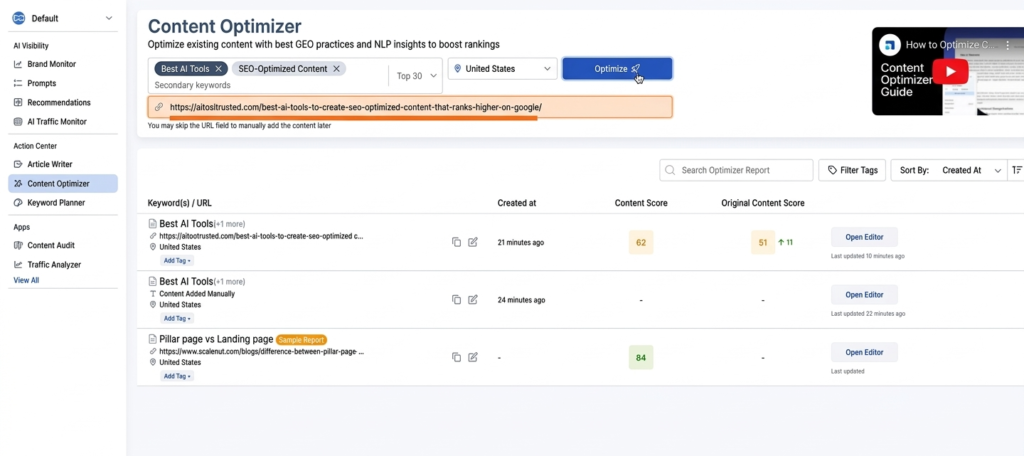
The first step is to log into the Scalenut AI Tool dashboard.
What I do:
- Go to Content Optimizer
- Click on “Optimize”
- Enter:
- Target keyword (e.g., Best AI Tools)
- URL or existing content
Key Settings:
- Select Target Country (e.g., United States)
- Choose ranking depth (Top 10 / Top 30)
👉 This AI Tool analyzes top-ranking competitors and builds a data-driven optimization plan.
Step 2: Analyze Content Score and SEO Metrics
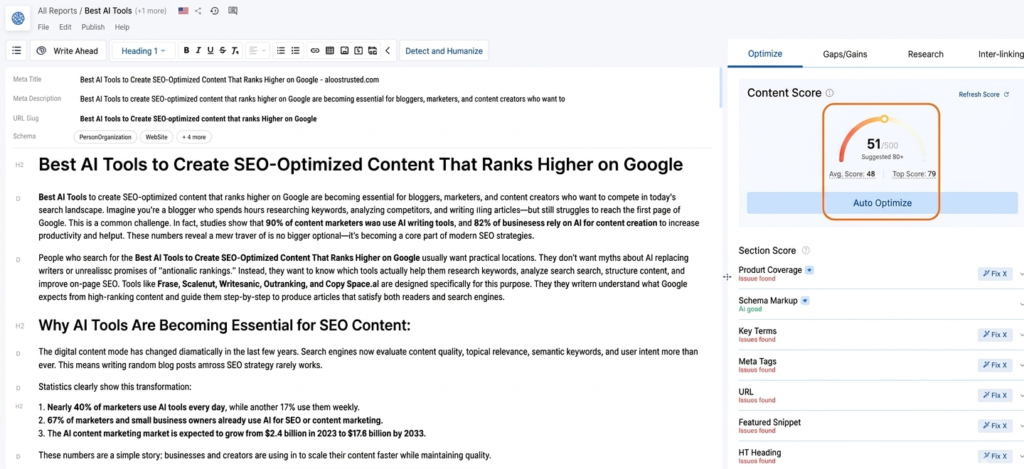
Once the analysis is ready, the AI Tool gives a Content Score.
What I check:
- Overall Content Score (e.g., 51 → 80 → 89 improvement)
- Keyword usage
- Content depth
- Readability
- SEO coverage
💡 My goal is to increase the score above 80+ using this AI Tool.
Step 3: Fix Key SEO Elements (High Impact Changes)
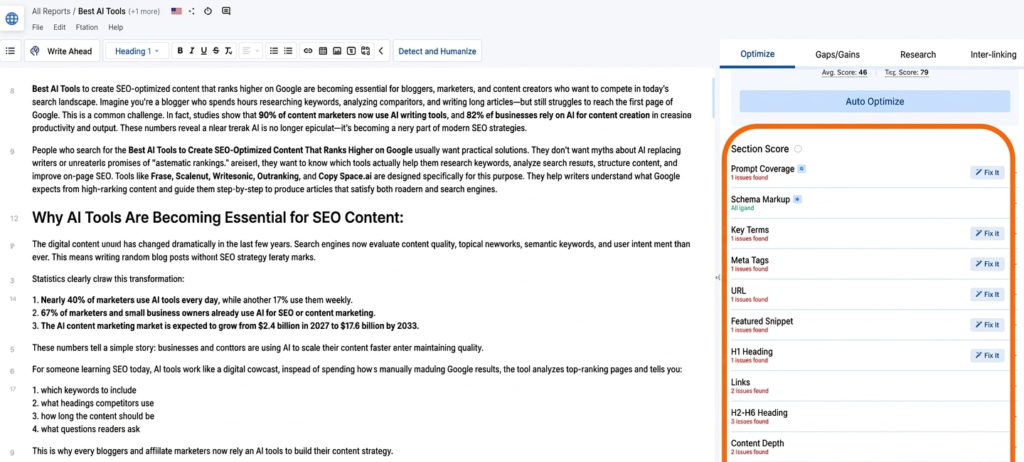
The AI Tool highlights missing or weak SEO elements.
I focus on:
- Meta Title
- Meta Description
- H1 Heading
- Subheadings (H2, H3)
- Internal links
- Keyword placement
Example:
If my AI Tool shows missing keywords, I:
- Add them naturally into headings
- Include them in the introduction
- Use them in image alt text
👉 This is one of the fastest ways to boost rankings using this AI Tool.
Step 4: Improve Prompt Coverage (Hidden Ranking Factor)
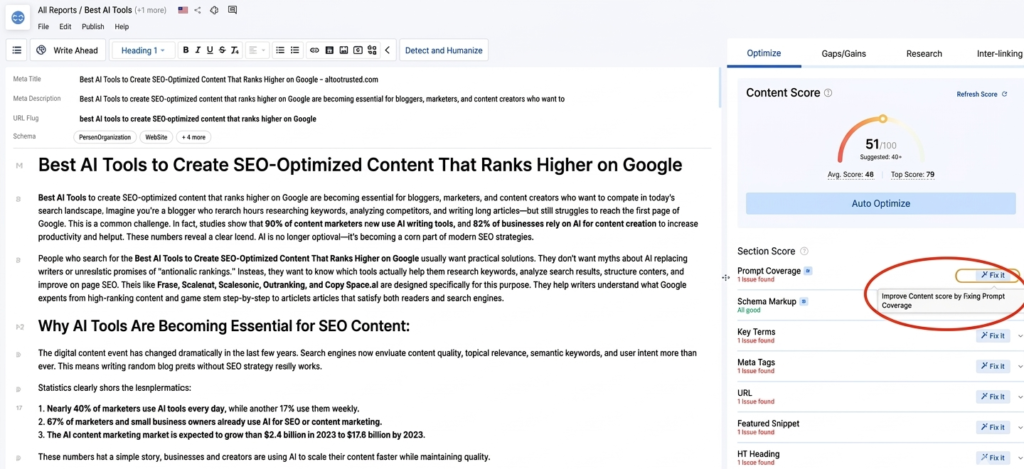
One powerful feature in this AI Tool is Prompt Coverage.
What it shows:
Questions your content must answer, like:
- What are the key steps in SEO optimization?
- Which AI tools are best?
- How to measure content performance?
What I do:
- Add a FAQ section
- Answer each question clearly
- Use simple, structured explanations
👉 This helps rank in:
- Featured snippets
- “People Also Ask” section
Step 5: Optimize Key Terms Using AI Tool Suggestions
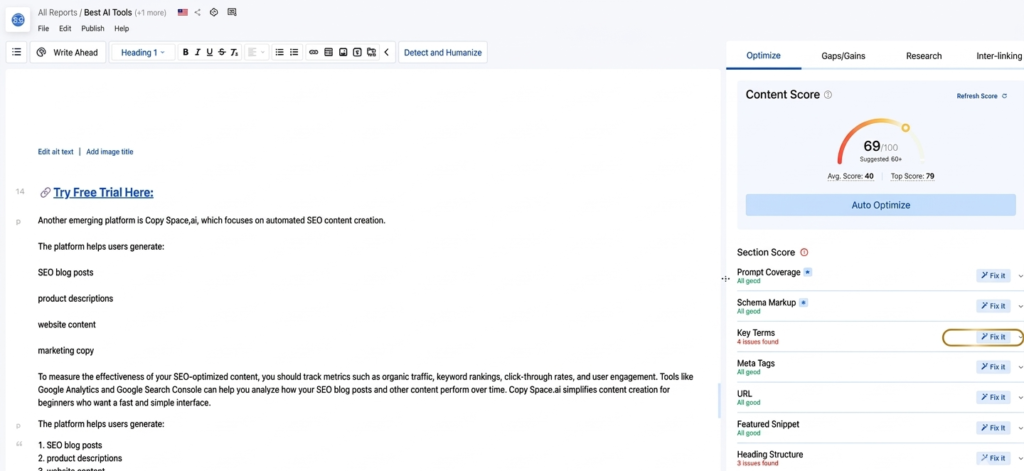
One powerful feature of this AI Tool is Key Terms (NLP keywords).
What I do:
- Add missing keywords suggested by the AI Tool
- Maintain natural keyword density
- Avoid keyword stuffing
Example Keywords:
- AI Tool
- SEO content optimization
- content ranking
- Google ranking factors
👉 This step alone improved my rankings significantly.
Step 6: Rewrite Weak Content Using AI Tool
Sometimes, content is outdated or poorly structured.
This AI Tool helps rewrite sections intelligently.
My process:
- Identify low-quality paragraphs
- Use AI Tool to rewrite content
- Improve clarity and readability
- Add more depth and examples
Example Improvements:
- Old: Generic explanation
- New: Detailed, SEO-optimized explanation
👉 The AI Tool ensures content matches search intent.
Step 7: Improve Content Depth and Structure
The AI Tool suggests what your competitors are covering.
I enhance:
- Add new sections
- Include FAQs
- Expand thin content
- Add examples and case studies
Structure I follow:
- Introduction
- Problem
- Solution using AI Tool
- Step-by-step guide
- Benefits
- FAQs
👉 Google prefers in-depth content, and this AI Tool helps achieve that.
Step 8: Use Auto Optimize Feature
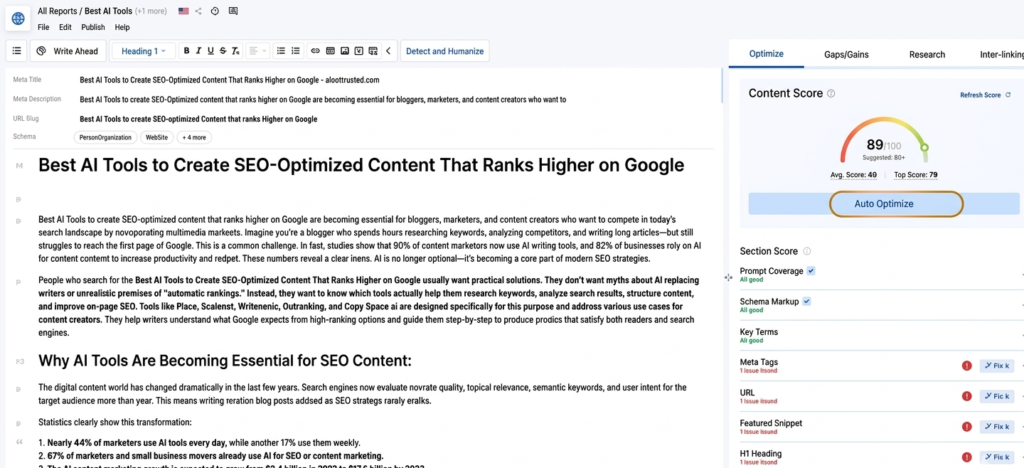
This AI Tool also has an Auto Optimize option.
What it does:
- Automatically improves keyword usage
- Enhances content readability
- Boosts SEO score
My tip:
Use it, but always manually review content.
👉 AI Tool + human editing = best results.
Step 9: Track Improvements in Content Score
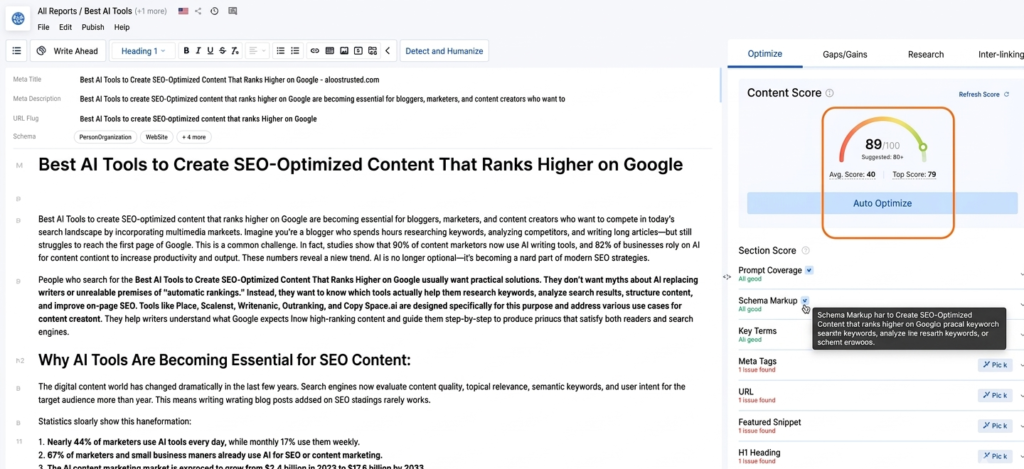
After optimization, I compare scores:
| Stage | Content Score |
|---|---|
| Before Optimization | 50–60 |
| After Basic Fixes | 70–80 |
| After Full Optimization | 85–90+ |
👉 This AI Tool gives measurable improvements.
Step 10: Publish and Monitor Results
After optimizing with this AI Tool:
I do:
- Update the article
- Re-submit to Google Search Console
- Track rankings
- Monitor traffic
Results I noticed:
- Better keyword rankings
- Increased organic traffic
- Higher engagement
Benefits of Using This AI Tool:
Using this AI Tool regularly gives huge advantages:
- Faster content optimization
- Data-driven SEO decisions
- Better keyword targeting
- Higher ranking chances
- Saves time and effort
How I Create SEO-Optimized Content Using This AI Tool (Step-by-Step Guide)
Common Mistakes to Avoid:
Even with the best AI Tool, mistakes can happen.
Avoid these:
- Keyword stuffing
- Ignoring readability
- Copying AI content blindly
- Not updating old information
👉 Always balance AI Tool insights with human editing.
Real Strategy I Follow (Summary):
Here’s my exact workflow using this AI Tool:
- Enter keyword in AI Tool
- Analyze content score
- Fix SEO basics
- Add NLP keywords
- Rewrite weak content
- Improve structure
- Cover missing topics
- Use auto optimize
- Recheck score
- Publish and track
Frequently Asked Questions (FAQs) About Scalenut AI Tool
Q1: What is the best AI Tool for content optimization?
👉Scalenut is one of the best AI Tool options for optimizing existing content.
Q2: Can an AI Tool improve Google rankings?
👉Yes, a good AI Tool helps optimize content based on SEO data, improving ranking chances.
Q3: How often should I optimize content using AI Tool?
👉Every 3–6 months or when rankings drop.
Q4: Is AI Tool content SEO-friendly?
👉Yes, when used correctly with human editing.
Q5: Does Scalenut replace human writers?
👉No, Scalenut is an AI assistant—not a replacement. It helps speed up content creation and optimization, but human editing is still important for quality and readability.
Final Thoughts:
Optimizing old content is one of the easiest ways to grow your website traffic—and using the right AI Tool makes it even more powerful.
Scalenut is not just a writing assistant—it’s a complete AI Tool for SEO optimization. If you follow this step-by-step process, you can turn underperforming articles into high-ranking pages.